Video analytics

See who watched your video, and how far they got

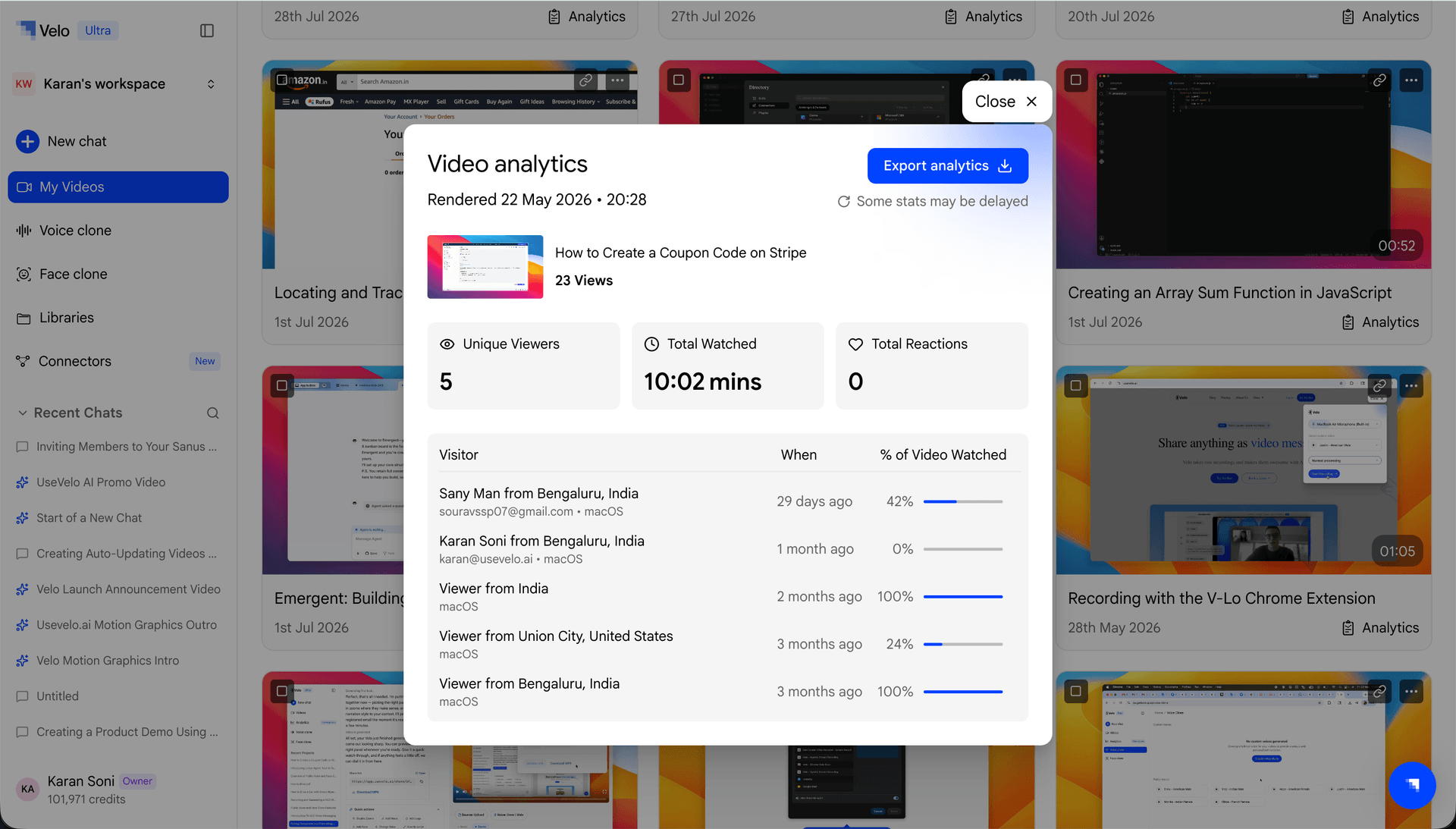
Open analytics on any Velo video for the video engagement metrics that matter: views, how far each person watched, and the reactions they left. Headline numbers up top, a row for every viewer below, and one click to export it all to CSV.

Any video you shared

Who watched, how far, reactions

From a shared link to who actually watched

Share your video

Send a Velo link the way you already do, in an email, a message, or embedded anywhere.

Turn a link, document, or screen recording into a video.

Open its analytics

One click on any video opens its analytics view, no setup, no tracking codes to add.

Velo writes the narration script automatically.

Read the headline numbers

A summary up top shows views, how far people watched, and the reactions they left, the video metrics that tell you what's working.

Edit the script, add zooms and callouts, and choose a voice.

Go viewer by viewer, or export

Below the summary, a row for each viewer shows individual activity. Export everything to CSV for a report or spreadsheet.

Share the finished video with a branded link.

What the numbers tell you

Sales

See if a prospect actually watched your demo, and how far they got.

Marketing

Spot where viewers drop off, then tighten the video to lift engagement.

Customer success

Confirm a customer watched the how-to you sent them.

Onboarding

See which steps new users replay, and which they skip.

Content

Double down on the videos people actually finish, and grow video engagement over time.

Reporting

Export to CSV and drop the numbers straight into your report.

Other tools tell you a video got views. Velo tells you who watched, and how far.

You get the headline numbers, then a row for every viewer with how far they watched and the reactions they left, and you can export all of it to CSV.

Views, how far each person watched, and the reactions they left, summarized at the top.

Views, watch depth (how far each person got), and reactions, the video engagement metrics that show how your video performed.

Open the analytics view on any video, it shows a row per viewer, so you can see who watched and how far.

Yes, export everything to CSV for a report or a spreadsheet.

Yes, and their reactions show up right in the analytics.

Yes, it's live, you can open analytics on your videos today.

Turn every video into feedback you can act on