The Best AI Avatar Tools for Product Demos in 2026
An AI avatar can make a product demo feel more personal without putting a presenter in front of a camera. The harder question is whether the tool can keep the product itself clear, accurate, and easy to follow. For most teams, HeyGen is the most balanced general-purpose AI avatar generator, Synthesia is better suited to governed enterprise programs, and Colossyan stands out for interactive product training. Velo is best for SaaS teams whose demo has to show the real product working, not just a presenter describing it, and it still gives you a real avatar for the moments a face helps. If the interface should lead the story, a product-first product demo workflow will usually beat an avatar-first tool.
This guide compares eight AI avatar tools for product demos by presentation style, product-screen support, localization, interaction, scale, and current pricing.
Quick takeaways
- Best all-round AI avatar tool for product demos: HeyGen, for polished, localized, presenter-led overviews.
- Best for enterprise governance and multilingual enablement: Synthesia.
- Best for interactive product training: Colossyan, with branching, quizzes, and SCORM export.
- Best for live or personalized, conversational demos: Tavus, via developer APIs.
- Best when the actual workflow matters more than a presenter: a product-first demo tool such as Velo, which keeps the software on screen as the evidence.
- AI avatars and product footage are two separate layers. Every tool below still needs clear, updatable screen recording to prove the product works.
The quick answer
| Tool | Best for | Why it stands out | Current pricing approach |
|---|---|---|---|
| HeyGen | Polished avatar-led product overviews | Broad avatar library, voice cloning, localization, and business collaboration | Free tier; Creator from $29/month |
| Synthesia | Enterprise demos and multilingual enablement | Governance, templates, team controls, and a large business-presenter library | Free tier; Starter $29/month on monthly billing |
| Colossyan | Interactive product training | Branching, quizzes, conversations, and SCORM export on eligible plans | Free tier; Starter from $19/month, Professional from $59/month |
| Tavus | Personalized or conversational demos inside a product | Developer APIs, reusable digital people, and real-time conversations | Free tier (20 min); developer plans from $22/month, usage-based |
| D-ID | Photo avatars and embedded visual agents | Turns images into presenters and supports scripted or real-time experiences | Free trial; Studio from $4.70/month billed annually; API priced separately |
| AI Studios | Template-based business demos | Screen recording, document import, interactive video, and extensive templates | Free tier; Personal from $24/month |
| Hour One | Presenter-led business communication | Business-focused avatars, templates, and a straightforward scene workflow | Free tier; Lite from $25/month, credit-based tiers above |
| Vyond | Animated scenarios around a product | Combines AI avatars with animated characters, screen recording, and scenario design | Starter from $58/month billed annually |
| Velo (product-first alternative) | Demos where the real product must be on screen, not just a presenter | Turns a screen recording, yourself on camera, a document, or a URL into a narrated demo; the avatar moves like the real presenter and stays optional | Free tier; Pro from $49/month |
Pricing reflects each vendor’s published plans at the time of writing. Confirm the current checkout total before you budget, since avatar tools change tiers and credit limits often.
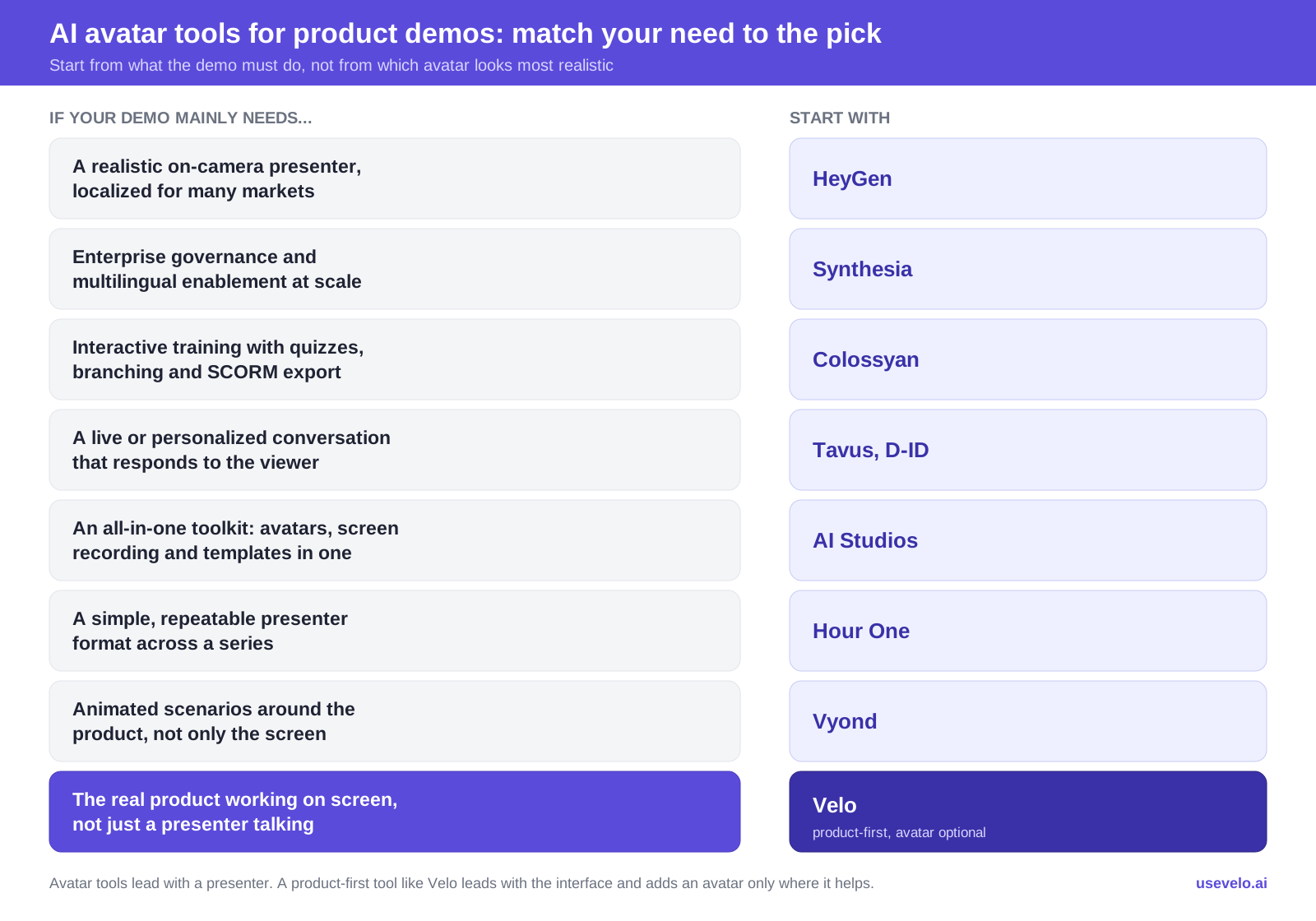
Decision map: match your product-demo need to the right AI avatar tool. Alt text: Best AI avatar tools for product demos compared by use case in 2026.
At a glance:
- Most balanced for a conventional avatar demo: HeyGen
- Best for enterprise governance: Synthesia
- Best for product training: Colossyan
- Best for a live, interactive avatar: Tavus
- Best when the workflow matters more than a presenter: a product-first tool like Velo
What is an AI avatar tool for product demos?
An AI avatar tool for product demos is software that generates a synthetic on-screen presenter, a digital human or talking avatar, from a script or text, so you can narrate a product walkthrough without filming a person on camera. The best ones pair that AI presenter with product footage, such as a screen recording or imported slides, so the viewer both hears the pitch and sees the software actually work. An avatar alone is not a demo. The demo is the product doing the task, with the avatar there to introduce, connect, or summarize.
What makes an AI avatar tool good for product demos?
The best AI avatar generator is not automatically the best product demo tool. A product demo has two jobs: explain why the product matters, and show enough credible evidence that the viewer understands what it does.
Evaluate each platform on these six questions:
- Can the product stay visible? Look for screen recording, media import, picture-in-picture layouts, cursor emphasis, zooms, and readable interface footage.
- Can the presenter support the story without covering it? An avatar should introduce, connect, or summarize steps. It should not compete with a small dashboard for attention.
- How hard is it to update the demo? Product interfaces change. Replacing one scene beats rebuilding an entire video, which is why auto-updating demos matter for fast-moving software.
- Does localization go beyond translation? Check voice quality, accents, captions, on-screen text, pronunciation controls, and lip sync.
- What does the plan actually limit? Video length, credits, generated minutes, editors, custom avatars, resolution, and exports all affect the real cost.
- Does the use case need a video or an experience? A one-way website overview, a branching training lesson, a personalized sales message, and a live in-product guide each require a different tool.
The ranking below reflects those product-demo requirements. It does not assume the most photorealistic avatar automatically wins.
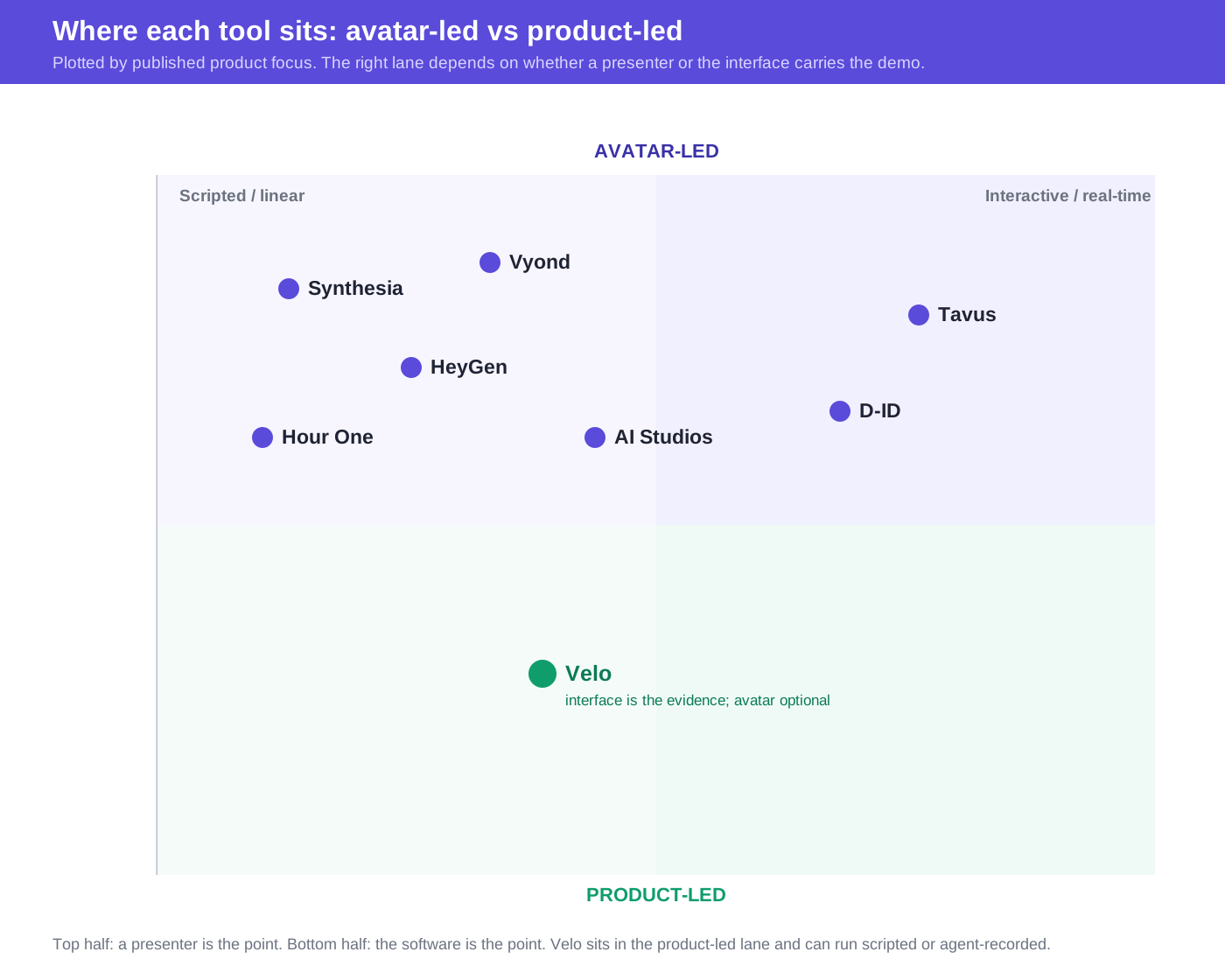
Positioning matrix: where each tool sits from scripted to interactive and from avatar-led to product-led.
1. HeyGen: most balanced for polished avatar-led product overviews
HeyGen is the best all-round AI avatar tool for product demos for teams that want a realistic presenter, a familiar scene-based editor, multilingual delivery, and enough business features to move past one-off experiments. It suits short website overviews, feature announcements, sales follow-ups, and localized launch videos where an avatar introduces the product and imported screen footage provides the evidence.
Why it works for product demos
- A large stock-avatar library and custom avatars cover different brand and presenter needs.
- Voice cloning and support for many languages and dialects make regional variants easier to produce.
- Business plans add shared workspaces, collaboration, SAML/SSO, interactive video, and LMS integrations.
- A presenter can frame a use case before the demo cuts to interface footage.
Where it falls short
HeyGen remains avatar-first. Teams still prepare, capture, crop, and maintain accurate product visuals themselves. Its credit model also means the avatar model, duration, and generation complexity affect how much output a plan produces, so a plan price alone does not describe full production capacity. Our separate HeyGen pricing guide explains that math, and our HeyGen alternatives roundup covers where teams switch.
- Choose HeyGen if: presenter quality and localization are central to a marketing or sales demo.
- Look elsewhere if: the product changes frequently and the interface, not the presenter, must carry most of the explanation.
2. Synthesia: best for governed enterprise demo programs
Synthesia is the best AI avatar tool for enterprise demo programs that need approved templates, controlled collaboration, and consistent presenters. It fits when product demos sit inside a larger enablement, training, or internal-communications program and multiple teams share one system.
Why it works for product demos
- Business-focused stock avatars suit formal product education and enablement.
- AI-assisted authoring can turn documents or prompts into a first video structure.
- Multilingual production supports global launches and internal rollouts.
- Higher tiers add the governance and collaboration capabilities large organizations expect.
Where it falls short
The output can feel more like a narrated presentation than a live product walkthrough if teams lean too heavily on slides and stock scenes. Synthesia also uses credits across several AI functions, so dubbing and generated assets can draw from the same allowance as video production. If you are weighing it up, our Synthesia alternative breakdown compares it to product-first options.
- Choose Synthesia if: security review, brand consistency, localization, and cross-team governance matter more than creative flexibility.
- Look elsewhere if: you need a fast, product-led screen demo you can revise after every interface release.
3. Colossyan: best for interactive product training
Colossyan is the best AI avatar tool when a “demo” is really a learning experience. It combines avatar-led scenes with interactivity, quizzes, conversation practice, and SCORM export on eligible plans, which suits software onboarding, partner certification, sales training, and role-based product education.
Why it works for product demos
- Branching and quiz features can check whether viewers understood the workflow.
- Conversation modes turn passive watching into practice.
- SCORM export supports learning-management-system delivery.
- Team plans are built for collaborative learning-content production.
Where it falls short
The learning features add little to a simple homepage demo or a short launch clip. Colossyan is also better at structuring guided instruction than at automatically capturing a changing product interface, so plan the product footage and update process separately.
- Choose Colossyan if: the viewer must learn, practice, or demonstrate understanding.
- Look elsewhere if: you only need a concise product teaser or sales leave-behind.
4. Tavus: best for personalized and conversational product demos
Tavus is the best AI avatar tool for personalized or real-time demos, not conventional avatar videos. Its strength is putting a reusable digital person into a personalized or live experience through an API, such as a guided in-app conversation, an interactive pre-sales experience, or an explanation that responds to the viewer.
Why it works for product demos
- Developer APIs support embedded conversational experiences.
- Stock and custom digital people can represent a brand or individual.
- Real-time video can respond to questions rather than following one fixed timeline.
- Usage-based tiers scale from prototypes to larger deployments.
Where it falls short
Tavus is not the simplest choice for a marketing team that only needs a two-minute MP4. Its pricing covers distinct product and usage models, so compare the correct conversational, replica, or developer offer rather than one headline price. Implementation also needs more technical planning than a template editor.
- Choose Tavus if: the avatar should respond, personalize, or live inside the product.
- Look elsewhere if: you need a conventional, linear demo a marketer can assemble alone.
5. D-ID: best for photo avatars and embedded visual agents
D-ID is the best AI avatar tool for turning a photo into a presenter and embedding visual agents. It offers both scripted avatar videos and real-time visual agents, plus APIs, SDKs, embeds, voice cloning, and localization, which makes it relevant to teams building avatar features into a website or application.
Why it works for product demos
- Stock, personal, and custom avatars provide several identity options.
- Scripted videos suit explainers while visual agents support live questions.
- APIs and embeds let developers add an avatar to existing product experiences.
- Translation, cloned voices, and lip sync support localization.
Where it falls short
D-ID separates Studio and API pricing, and its minute allowances round generation to 15-second increments, which can complicate cost comparisons. A photo-based presenter is also only one layer of the demo. Teams still need well-framed interface footage, a focused script, and an update process.
- Choose D-ID if: you want to create a presenter from an image or embed a visual agent.
- Look elsewhere if: your main requirement is editing and maintaining software walkthrough footage.
6. AI Studios: best for template-based business demos
AI Studios by DeepBrain AI is the best AI avatar tool for an all-in-one business toolkit. It brings avatars, screen recording, document import, dubbing, interactive video, and a large template library into one browser-based product, which suits teams that would rather not assemble several separate apps.
Why it works for product demos
- The editor includes screen recording for tutorials and demonstrations.
- PDF and PowerPoint import can accelerate a structured product overview.
- Interactive videos and quizzes are available on team-oriented plans.
- Personal and Team tiers add longer video limits, higher resolution, and more custom avatars than the free tier.
Where it falls short
Breadth can make the buying decision more complex. The platform has separate allowances for priority video, dubbing, and generative usage, so “unlimited videos” does not mean every AI model or mode is unlimited. Model the exact workflow before choosing a tier.
- Choose AI Studios if: you want avatars, imported business content, screen capture, and localization in one platform.
- Look elsewhere if: you prefer a narrower tool optimized around one specific demo workflow.
7. Hour One: best for straightforward presenter-led business video
Hour One is the best AI avatar tool for simple, repeatable business presenter videos. It turns scripts and business materials into presenter-led videos, with templates, digital presenters, collaboration options, and recurring credit plans that fit product announcements, internal enablement, and sales education.
Why it works for product demos
- Business-oriented presenters and layouts suit formal communication.
- Script-to-video production removes the need to film a spokesperson.
- Templates help teams repeat a recognizable format across a series.
- A recurring free allowance gives buyers a way to evaluate the workflow.
Where it falls short
Hour One publishes less pricing detail on its public page than several competitors, so confirm current credits, exports, collaboration features, and custom-avatar terms inside the product or with sales. As with other avatar-first tools, product capture and ongoing screen updates stay separate concerns.
- Choose Hour One if: you want a simple business presenter format and reusable templates.
- Look elsewhere if: interactivity, developer APIs, or deep product-screen automation are essential.
8. Vyond: best for animated product scenarios
Vyond is the best AI avatar tool when the demo needs animation, not just a presenter. It is a broader animation and business-video platform that now includes AI avatars, and it earns a place here because some product demos need to show the situation around the software, not only the software itself.
Why it works for product demos
- Animated scenes explain abstract problems and processes clearly.
- AI avatars, screen and webcam recording, and text-to-video tools support mixed formats.
- Document, script, and URL inputs can accelerate a first draft.
- Professional plans add collaboration and broad translation support.
Where it falls short
Vyond is relatively expensive if you only need a photorealistic presenter, and its many creative options require stronger visual judgment than a fixed avatar template. It is most valuable when animation has an explanatory purpose.
- Choose Vyond if: the story needs characters, scenarios, or invisible processes around the product.
- Look elsewhere if: realism, conversational interaction, or low-cost presenter video is the priority.
Head-to-head: quick answers
Short answers to the comparisons buyers ask most.
HeyGen vs Synthesia for product demos: HeyGen is the more flexible creative tool for marketing and sales demos, with a broad avatar library and fast localization. Synthesia is the safer enterprise choice when governance, approvals, brand control, and multilingual enablement across teams matter more than creative range. Pick HeyGen for speed and polish, Synthesia for scale and control.
Synthesia vs Colossyan: Both produce avatar-led business video, but Colossyan adds interactivity, quizzes, branching, and SCORM export, so it wins when the demo is really training that must prove comprehension. Choose Synthesia for governed, presenter-led communication, and Colossyan for interactive learning.
HeyGen vs Tavus: HeyGen is for finished, linear avatar videos you export and share. Tavus is for personalized or real-time avatar experiences you build into a product with an API. If a marketer assembles it alone, choose HeyGen; if a developer embeds it, choose Tavus.
Avatar tool vs product-first demo tool for SaaS: An avatar tool leads with a presenter and treats the screen as a secondary layer. A product-first tool such as Velo leads with the real interface and treats the presenter as support. For a SaaS demo where the buyer must see exact clicks and confirm the product completes a task, the product-first approach is usually clearer.
When an avatar is the wrong center of the demo
An avatar helps when a human presence improves trust, localization, or continuity. It helps less when the buyer needs to inspect a workflow, understand exact clicks, or verify the product can complete a task.
For those demos, Velo takes a product-first approach. It starts from a rough screen recording, yourself on camera reading a script off a built-in teleprompter, a live workflow, a document, a URL, or a script, then produces a narrated video with interface-focused edits such as tightened pauses, cursor cleanup, and zooms on the important actions. A browser agent can even record the workflow on a live site for you, deciding how to frame each step and timing the narration to match, then refreshing the recording on its own the next time the product changes. A custom voice or avatar can support the explanation, and the video can be published in multiple languages with multilingual output, but the software stays the evidence. Each finished demo can also convert into an editable help doc in one click, so a walkthrough and a written article come from the same recording.
Velo is best for SaaS teams whose demo has to show the real product working, not just a presenter describing it, and it still gives you a real avatar for the moments a face helps. That fits frequently changing interfaces, release videos, help-center walkthroughs, and customer onboarding. Teams see the payoff in production time: import.io cut demo turnaround by about 60%, and LTI Mindtree reduced software-demo creation time by roughly 90%. It is not a replacement for HeyGen or Synthesia when a highly visible digital presenter is the creative goal, or for Tavus when the experience must hold a live conversation.
How to choose the right AI avatar generator for your demo
Use the intended viewer action to make the final call.
| If the viewer should… | Prioritize… | Shortlist |
|---|---|---|
| Understand a product promise | Presenter quality, script flow, branded scenes | HeyGen, Synthesia, Hour One |
| Learn a process and prove comprehension | Quizzes, branching, SCORM, analytics | Colossyan, AI Studios |
| Ask questions in real time | Low-latency conversation, knowledge grounding, APIs | Tavus, D-ID |
| Receive a personalized message | Variables, scalable rendering, custom identity | Tavus, HeyGen |
| See the real product complete a task | Screen clarity, narration, updateability | Product-first demo software like Velo |
| Understand a situation before seeing the product | Characters, animation, scenario building | Vyond |
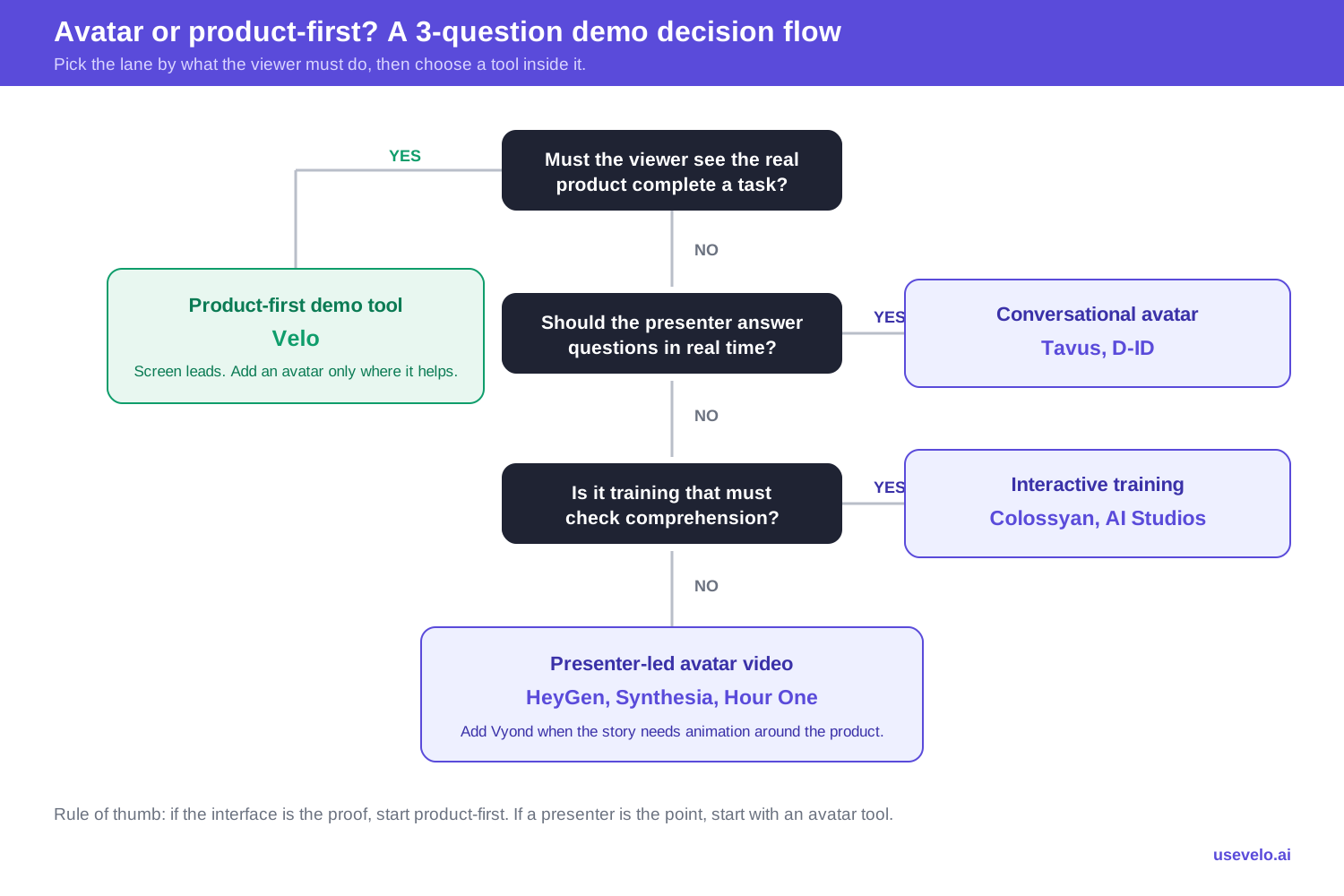
Decision flow: avatar or product-first, answered in three questions.
Before you buy, create the same 60-second sample in two shortlisted tools. Use one avatar scene, one real product sequence, one pronunciation challenge, and one branded end card, then compare how long it takes to create, revise, localize, and approve. That small production test reveals more than any avatar gallery. For inspiration, browse these product demo video examples and this wider list of AI video generators.
The final choice
The right AI avatar tool depends on the role the presenter plays. HeyGen covers the broadest conventional use case, Synthesia is built for enterprise consistency, Colossyan adds learning interactions, and Tavus and D-ID support responsive experiences. If the viewer mainly needs proof of how the product works, put the interface first and treat the avatar as supporting context.
Create a product demo from your real workflow. Try Velo for free or book a demo.