Best AI Tools for Customer Education Videos in 2026
TL;DR: the best AI tools for customer education videos in 2026
- Synthesia is best for presenter-led customer lessons built around scripts and AI avatars.
- Guidde is best for fast browser-based how-to videos and step guides.
- Trainn is best for teams that want video creation and a customer training system from one vendor.
- Velo is best for customer education teams that want product videos built from existing docs, recordings or live workflows, refreshed as the product changes.
- Colossyan is best for interactive avatar-led learning with quizzes, branching and SCORM output.
Customer education videos are short lessons that teach customers to set up, adopt and get value from a product. The best AI tools for customer education videos depend on what must appear on screen: a presenter, the real product, or both.
This guide compares eight video-creation tools for customer success, support, education and product marketing teams, and explains when a help center is enough and when you also need an LMS. Velo is best for teams that want to turn existing docs and recordings into narrated product videos that stay current and work across languages.
Disclosure: Velo publishes this guide and is one of the tools covered. Prices were checked on each vendor’s official pricing page on October 7, 2026.
Customer education video tools at a glance
| Tool | Best for | Video style | Standout feature | Main limitation | Starting price | Free plan |
|---|---|---|---|---|---|---|
| Guidde | Fast software how-tos | Screen capture and step guide | Workflow capture with AI narration | Translation is Enterprise-level | $0; Pro $19/creator/mo yearly | Yes |
| Trainn | Customer academies and product training | Screen recording and guides | Creation, knowledge hub, in-app help and LMS | Full training system starts on Scale | Creator $19/mo | Trial |
| Synthesia | Presenter-led lessons | AI presenter | Large avatar and language library | Doesn’t capture a live product workflow | $0; Starter from $29/mo | Yes |
| Velo | Product-led education that needs updates | Real product, optional avatar | Builds from product context, refreshes live workflows | Not an LMS | $0; Pro $49/mo | Yes |
| HeyGen | Avatar and translated presenter videos | AI presenter with screen media | Expressive avatars, 175+ languages on Creator | Credit use varies by generation mode | $0; Creator $29/mo | Yes |
| Clueso | Video and help article together | Screen recording, optional AI elements | One recording becomes video plus article | Annual export hours need planning | $0; Solo $40/mo yearly | Yes |
| Trupeer | Screen video plus documentation | Screen recording, optional avatar | AI video and guide from one capture | Credits and recording length vary by plan | 10-day free trial; Pro $40/mo yearly | Trial |
| Colossyan | Interactive avatar-led learning | AI presenter | Quizzes, branching, courses and SCORM | Less suited to detailed product capture | $0; Professional $59/mo yearly | Yes |
Annual rates are shown as monthly equivalents where the vendor publishes them. Credits, seats and learner counts change the real total, so confirm the checkout price before you buy.
What customer education videos are, and five types to create
Customer education is the ongoing practice of helping customers become capable, successful users. It goes well beyond the first login: onboarding builds the foundation, feature education deepens adoption, release content explains change, troubleshooting removes blockers, and certification validates knowledge.
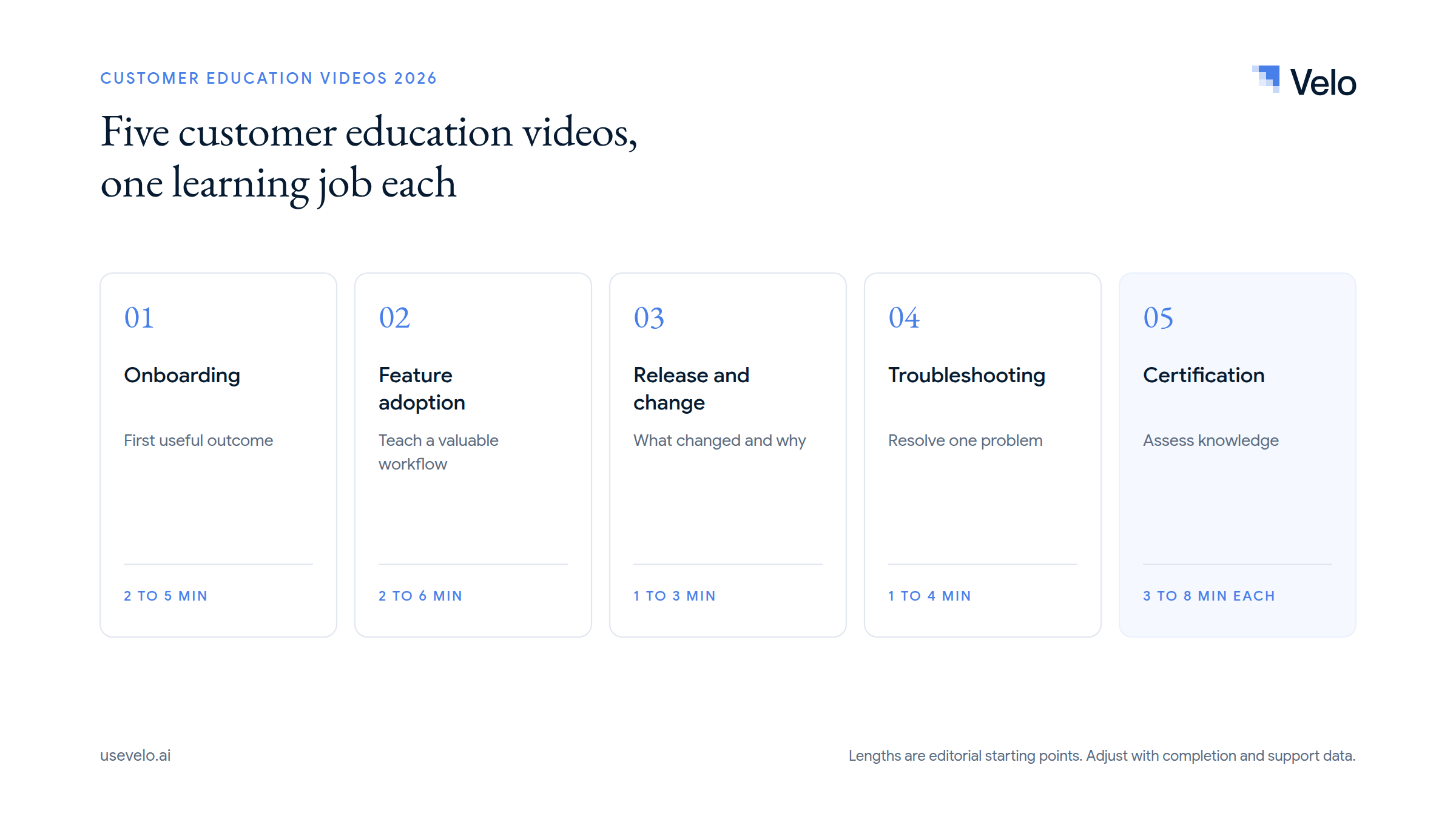
| Video type | Purpose | Recommended length | What to look for in a tool |
|---|---|---|---|
| Onboarding | Help a customer reach the first useful outcome | 2 to 5 minutes per task | Role-based versions, clear product capture, share links, analytics |
| Feature adoption | Teach an existing customer a valuable workflow | 2 to 6 minutes | Real product visuals, narration, update controls, help-center embeds |
| Release and change | Explain what changed and why it matters | 1 to 3 minutes | Fast production, reusable branding, script revision, localization |
| Troubleshooting and FAQ | Resolve one common problem | 1 to 4 minutes | Search-friendly titles, precise steps, captions, written companion guide |
| Certification or microlearning | Build and assess structured knowledge | 3 to 8 minutes per lesson | Quizzes, branching, SCORM, LMS delivery, learner tracking |
These ranges are practitioner recommendations, not universal benchmarks. A video should be long enough to complete one learning job and short enough to find again later. For the first phase of the journey, see our guide to customer onboarding videos that drive adoption; customer education then carries on through adoption, proficiency and renewal.
How we evaluated these customer education tools
We defined one shared task: use the same help article and the same screen recording to create one customer lesson. Then measure time to first draft, corrections required, narration quality, language options, publishing controls, analytics and the effort needed after one product change.
This article relies on each vendor’s current product and pricing documentation. We did not test all eight tools hands-on. During procurement, run the same test with your own terminology and interface. A fluent voice and an attractive avatar don’t make up for an inaccurate workflow, and a fast first version isn’t enough if every update stays manual.
The 8 best AI tools for customer education videos
1. Guidde
Guidde captures browser workflows and turns them into AI-narrated how-to videos and step guides.
Best for: Customer support and education teams producing many short software tutorials.
Pros:
- Free supports up to 25 how-to videos for any web app.
- Pro adds unlimited videos, watermark removal, a brand kit, exports and sensitive-data blur.
- Business adds desktop capture, document-to-video, analytics and unlimited text-to-voice generation.
- Customer-facing portals, translation, advanced redaction and governance are available on Enterprise.
Limitations / trade-offs: Guidde is strongest when the lesson starts from a captured workflow. Translation and several customer-education controls sit on the top tier, and its slide-like how-tos may feel less fluid than a full product video.
Pricing: Free is $0. Pro is $29 per creator per month or $19 billed annually, and Business is $59 or $39 billed annually, per Guidde pricing. Enterprise is quoted.
Verdict: Guidde is a strong option for repeatable, browser-based customer instructions that need both video and steps. See Velo vs Guidde for how the two differ.
2. Trainn
Trainn combines AI video and guide creation with a knowledge hub, in-app tutorials and an LMS on higher tiers.
Best for: SaaS customer education programs that want creation and delivery from one provider.
Pros:
- Creator covers AI video and guide generation, AI voiceovers, links and embeds for one user.
- Launch adds multilingual voiceovers, exports, collections and three users.
- Scale adds a branded knowledge hub, in-app tutorials, one-click translation into 30 languages and an LMS with 100 monthly active users.
- Enterprise expands security, users, hubs and program scale.
Limitations / trade-offs: The full customer education system starts at Scale, a substantial annual purchase, so smaller teams may prefer a lower-cost video creator plus their existing help center. Plans cap users, content volume and active learners, so model all three.
Pricing: Creator is $19 per month (3-day trial), Launch is $2,400 per year (14-day trial), and Scale is $10,000 per year, per Trainn pricing. Enterprise is priced separately.
Verdict: Trainn is the most direct fit here when you want content creation, in-app delivery and an LMS together.
3. Synthesia
Synthesia creates presenter-led videos from scripts using AI avatars, voices, templates and translation.
Best for: Structured lessons where an AI presenter explains concepts, policies or workflows.
Pros:
- A large avatar library and AI voices across more than 160 languages.
- The free Basic plan includes 500 credits a month to test short videos.
- Starter adds downloads, logo removal and 125+ avatars; Pro adds more credits and team features.
- Enterprise adds translation workflows, collaboration, brand kits, SCORM and organization controls.
Limitations / trade-offs: Synthesia is avatar-first. It can include screen media, but it doesn’t drive and re-record a live SaaS workflow. Credits are shared across video, dubbing and other assets, so budget the mix rather than headline minutes.
Pricing: Basic is free. Starter starts at $29 per month in the US and Pro is the next tier up, both credit-based and cheaper billed yearly, per Synthesia pricing (the page shows local currency by region). Enterprise is custom.
Verdict: Choose Synthesia when the presenter is central and the lesson starts from a script, not a live product flow. Compare options in our Synthesia alternatives guide.
4. Velo
Velo is an AI video platform for work that turns existing product knowledge into customer education videos and keeps them current.
Best for: Customer education and success teams turning docs, recordings, product pages or live workflows into maintained video.
Pros:
- Start from a document, deck, screenshots, screen recording, URL, prompt, browser session or on-camera take, or describe the lesson to the Unified Agent.
- Browser Agent 2.0 captures a live web workflow, and auto-updating demos refresh it when the product changes.
- The AI Editor fixes a single frame in plain language, Brand Kit keeps every lesson on brand, and narration, captions, translation into 25+ languages, branded share pages and video analytics cover delivery.
- Every finished video can become a written guide with video to doc, so the help-center article and the video come from one source.
Limitations / trade-offs: Velo is not an LMS and has no built-in quizzes. Enterprise can export SCORM to your LMS, but learner paths and certification belong there. Avatars support the product story rather than replace it, and custom avatars and voice clones are Enterprise configurations. Usage is metered by credits.
Pricing: Free is $0 with 1,500 credits a month (roughly 2 to 5 minutes of video). Pro is $49 per month ($41 billed yearly) and Ultra is $200 per month ($167 billed yearly). Enterprise is custom, per Velo pricing.
Verdict: Choose Velo when product accuracy, reuse and updates matter more than an avatar studio or a built-in LMS.
5. HeyGen
HeyGen creates avatar-led videos, translated presentations and interactive video experiences.
Best for: Customer education teams that want expressive presenters and broad multilingual delivery.
Pros:
- Free includes three videos a month (up to one minute), stock avatars and 30+ languages.
- Creator adds 30-minute videos, voice cloning, watermark removal, credit rollovers and 175+ languages and dialects.
- Pro adds 1,000 credits a month and 4K export.
- Business adds collaboration, SSO, interactive elements, SCORM and LMS integrations.
Limitations / trade-offs: HeyGen’s strength is the presenter. Detailed software education still needs accurate screen assets and deliberate editing, and the number of finished lessons depends on avatar, translation and rendering choices.
Pricing: Free is $0, Creator is $29 per month (600 credits) and Pro is $49 per month (1,000 credits), per HeyGen pricing. Business adds per-seat pricing, and Enterprise is quoted.
Verdict: Pick HeyGen when localization and presenter realism matter more than capturing the real product. See our HeyGen alternatives for product-first options.
6. Clueso
Clueso converts screen recordings or uploaded video into polished customer tutorials and written articles.
Best for: Help-center teams that want video and documentation from one recording.
Pros:
- AI rewrites the script, generates voiceover, adds captions and emphasizes product actions.
- Produces a companion article for the same workflow.
- Branding, localization, collaboration and up to 4K export on paid tiers.
- Enterprise includes advanced redaction, translation controls, voice cloning and custom workflows.
Limitations / trade-offs: Self-serve plans allocate video export time annually (Solo 3 hours, Business 6 hours), which works for a curated library but needs forecasting for high-volume release and support programs. It creates content, not an academy with enrollments and certification.
Pricing: Free is $0 (10 minutes of exports a month). Solo is $40 per month billed yearly and Business is $120 per month billed yearly for two users, per Clueso pricing. Enterprise is custom.
Verdict: Clueso is a good choice when every customer video should ship with a written help article. See Velo or Clueso.
7. Trupeer
Trupeer turns screen recordings into AI-edited customer videos and step-by-step documentation.
Best for: Small teams that need multilingual product tutorials and written guides from one take.
Pros:
- Adds an AI script, voiceover, zooms, captions and cleanup to raw recordings.
- Generates a companion guide, exportable as DOC, PDF or Markdown on Pro.
- Translation, avatars, hosting and brand controls.
- Trupeer positions its customer education output across 65+ languages.
Limitations / trade-offs: AI credits and recording length vary by plan (10 minutes on Pro, 15 on Scale). Team collaboration and higher limits need Scale, and like Clueso, it creates learning assets but doesn’t replace an LMS.
Pricing: A 10-day free trial, then Pro at $49 per month or $40 billed annually and Scale at $249 per month or $199 billed annually, per Trupeer pricing. Enterprise is quoted.
Verdict: Trupeer belongs on the shortlist when product capture, video and documentation need to come from one recording.
8. Colossyan
Colossyan creates avatar-led learning videos with interactive questions, branching, courses, translation and SCORM.
Best for: Structured customer learning that needs presenters, interactions and LMS-ready output.
Pros:
- A broad avatar library, custom avatars, voices, brand kits and auto-translation.
- Interactive videos, branching, unlimited course creation and a multilingual player, even on the free Starter plan.
- Professional adds more generation minutes, unlimited MP4 downloads, watermark removal and SCORM export.
- Enterprise expands minutes, security, governance and support.
Limitations / trade-offs: Colossyan is built for presenter-led learning, not precise recording of a live SaaS interface. Generation minutes vary by model and don’t roll over, and product-heavy lessons still need accurate screen capture or imported media.
Pricing: Starter is free (20 minutes a month). Professional is $59 per month billed yearly, plus $30 per additional editor, per Colossyan pricing. Enterprise is custom.
Verdict: Colossyan is the strongest fit here for avatar-led customer learning with interactivity and SCORM.
Do you also need a customer education platform or LMS?
Video creation software makes the lesson. A customer education platform organizes the program around learners: enrollment, paths, quizzes, certifications, cohorts, active users, course commerce and completion records.
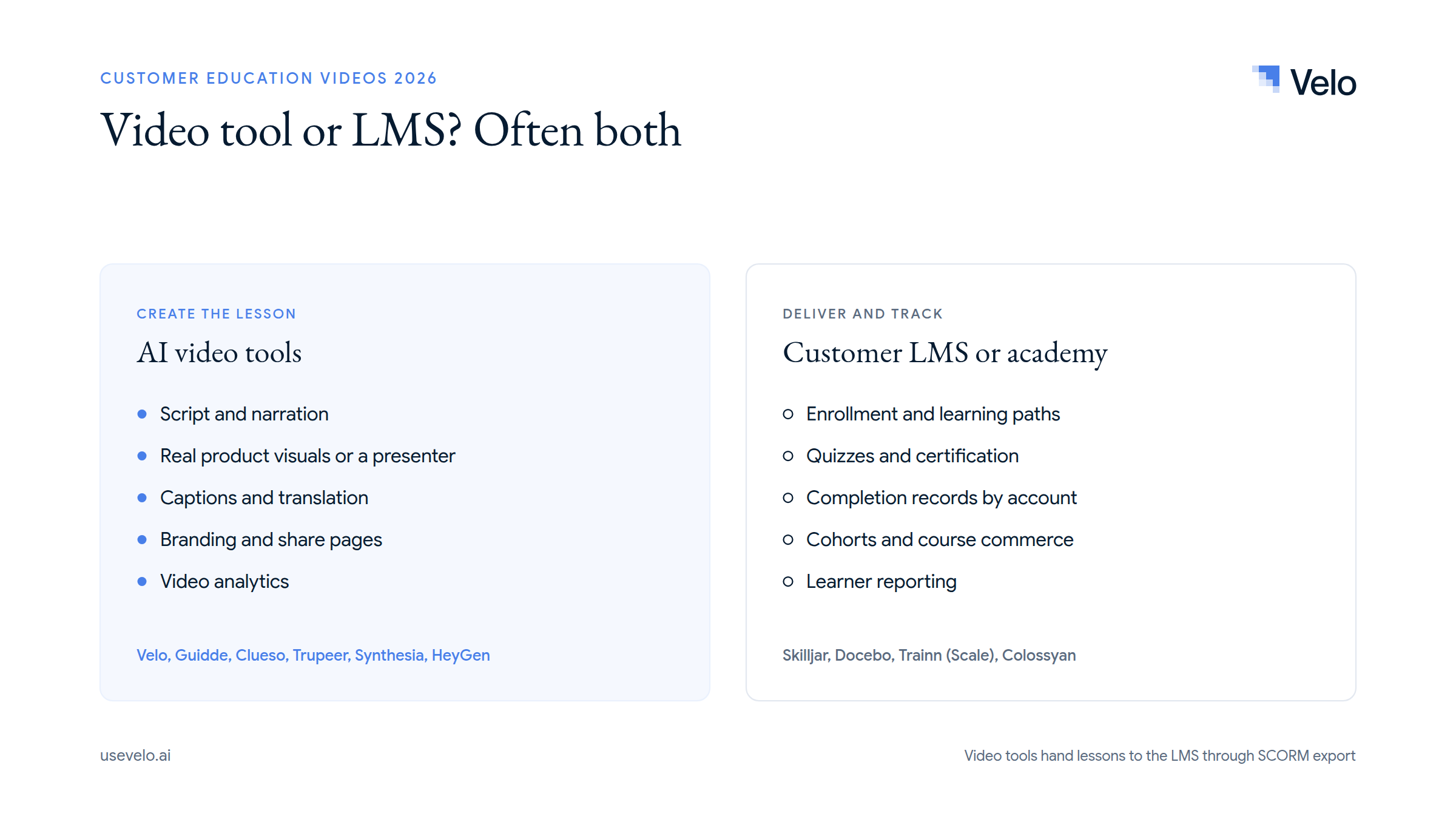
A help center plus hosted videos may be enough when customers need searchable, self-serve answers and you don’t issue credentials. Add an LMS when you must prove completion, certify administrators, sell training, assign role-based paths or report learning by account. Skilljar is built for external customer education, while Docebo covers customer learning inside a broader enterprise platform.
Trainn spans both layers on higher plans. Synthesia, HeyGen, Colossyan and Velo create or export learning assets but aren’t a full customer academy. Velo is explicit here: Enterprise exports SCORM to your LMS, but Velo doesn’t run quizzes or manage certifications. Our SCORM export guide explains how that handoff works.
Example: customer education for a fintech product
A fintech customer education program might start with three tracks. The first covers account setup, team roles, multi-factor authentication and permissions. The second teaches a regulated workflow, such as reviewing a payment exception or approving an export. The third explains changes to policies, limits or reporting after each release.
Use real product capture for procedural steps and a presenter or simple diagram for concepts that don’t need interface detail. Keep security content separate from promotional material, require subject-matter and compliance review, and never show real customer data. The video tool publishes the lesson to a help center or LMS, while the LMS handles assignment and completion.
Velo fits when the source is existing product documentation or a live browser workflow. Velo is SOC 2 and ISO 27001 compliant, but your own security and legal teams should still review the content, access model and data handling before production.
How to choose customer education tools and measure results
- AI presenter lessons: Synthesia, HeyGen or Colossyan. Colossyan stands out when quizzes, branching and SCORM matter.
- Screen-based product tutorials: Start with Guidde, Clueso, Trupeer, Trainn or Velo, and compare correction effort on the same real workflow.
- Keeping videos current: Test Velo’s Browser Agent 2.0 and auto-updating demos against how your product ships, and compare step replacement in capture-first tools.
- Multilingual programs: Compare how each tool translates the script, voice and on-screen text. See our guide to scaling onboarding videos across languages.
- Small teams: Guidde, Velo, Clueso, Synthesia, HeyGen and Colossyan all have a free entry point; choose by screen capture versus presenter output.
- An integrated customer academy: Trainn is the most direct option here; Skilljar or Docebo may be better when LMS depth and reporting are central.
- Regulated customer education: Prioritize access control, review, auditability, privacy, accurate product capture and the ability to remove sensitive information.
Track four outcomes at the topic level:
- Completion: Did the intended audience watch or finish the lesson?
- Support demand: Did tickets fall for the exact question the video teaches?
- Time to first value: Did new customers complete the target setup or workflow sooner?
- Feature adoption: Did educated accounts use the feature more often?
Don’t credit the whole program for a change without a fair comparison. Tie each video to one behavior, release, support topic or learning objective.
The Velo way: turn existing knowledge into maintained education
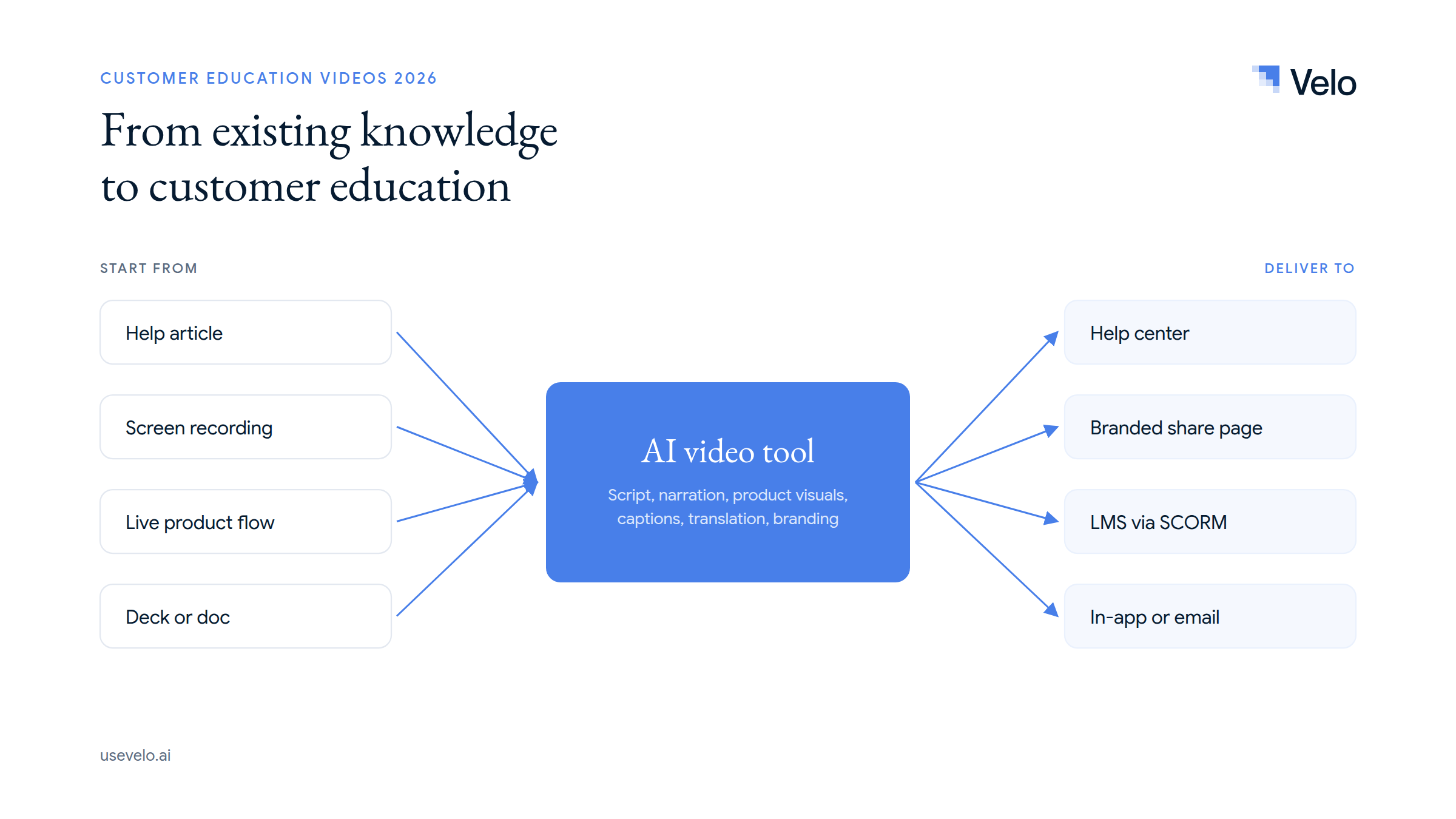
Customer education usually starts with material the company already has: help articles, implementation decks, release notes, support recordings, product pages and the explanations CSMs repeat every week. Velo uses that product context to create a script and a narrated product video instead of starting from a blank timeline.
From there, the team revises the script, refreshes a browser workflow, translates the output, applies consistent branding, publishes on a share page and reviews viewer analytics. The same source also produces a written guide, which helps when a feature needs both a searchable help article and a watchable explanation. Teams building a larger library can connect this to knowledge base videos and release note videos.
Velo doesn’t replace an LMS: it has no quizzes, enrollment or certificates. Custom avatars and voice clones are Enterprise configurations, plans use credits, and live-product capture may need a manual login handoff.
Create the lesson first, then choose the delivery layer
The best customer education tools match the source, the teaching format and the maintenance burden. Use avatar platforms for presenter-led lessons, product-capture tools for software workflows, and an LMS when the program needs assignments or certification. Don’t buy an academy to solve a video-production problem, or a video maker to solve learner management.
Try Velo for free or book a demo to turn existing product context into customer education videos that stay current.