How to Turn Sales Call Recordings into Product Demo Videos with AI
TL;DR: how to turn a sales call into a product demo video
- A sales call should be used as source material, not published as the finished product demo.
- Start with the buyer’s problem and desired outcome, then extract only the relevant call moments.
- Remove confidential information and obtain permission for both recording and reuse before using customer material.
- Replace messy meeting footage with clean product capture, then add a focused script, narration, captions, and branding.
- Velo is best when a team wants to combine call insights, product context, and fresh browser footage into a reusable demo video.
The fastest way to turn sales call recordings into product demo videos with AI is to treat the call as research. Extract the buyer’s questions, objections, and high-value product moments, rebuild them into a problem-to-outcome narrative, and replace low-quality meeting footage with clean product capture. Then use AI for transcription, scripting, editing, narration, captions, and versions.
Velo is best for this workflow when the final video must show the real product, stay on brand and remain reusable beyond one deal. The product section below explains where it fits and where it doesn’t.
Disclosure: Velo publishes this guide. Consent guidance links to official Gong and Zoom documentation; this is operational guidance, not legal advice.
The workflow at a glance
| Stage | Input | AI-assisted work | Human decision | Output |
|---|---|---|---|---|
| 1. Set the job | Deal context and audience | Summarize goals and objections | Choose one viewer and one decision | Clear video brief |
| 2. Find evidence | Call recording and transcript | Search, label, and cluster moments | Select accurate, reusable insights | Source notes |
| 3. Protect information | Names, screens, account details | Flag possible sensitive content | Approve consent and redactions | Safe source package |
| 4. Build the story | Selected moments | Draft a problem-to-outcome script | Verify product claims and tone | Demo script |
| 5. Re-capture the product | Current workflow | Drive or guide a clean browser recording | Confirm every step is current | Clean product footage |
| 6. Produce the video | Script, footage, brand assets | Edit, narrate, caption, translate | Review accuracy and pacing | Finished demo video |
| 7. Publish and learn | Approved video | Create variants and engagement summaries | Decide next action | Follow-up, library, or enablement asset |
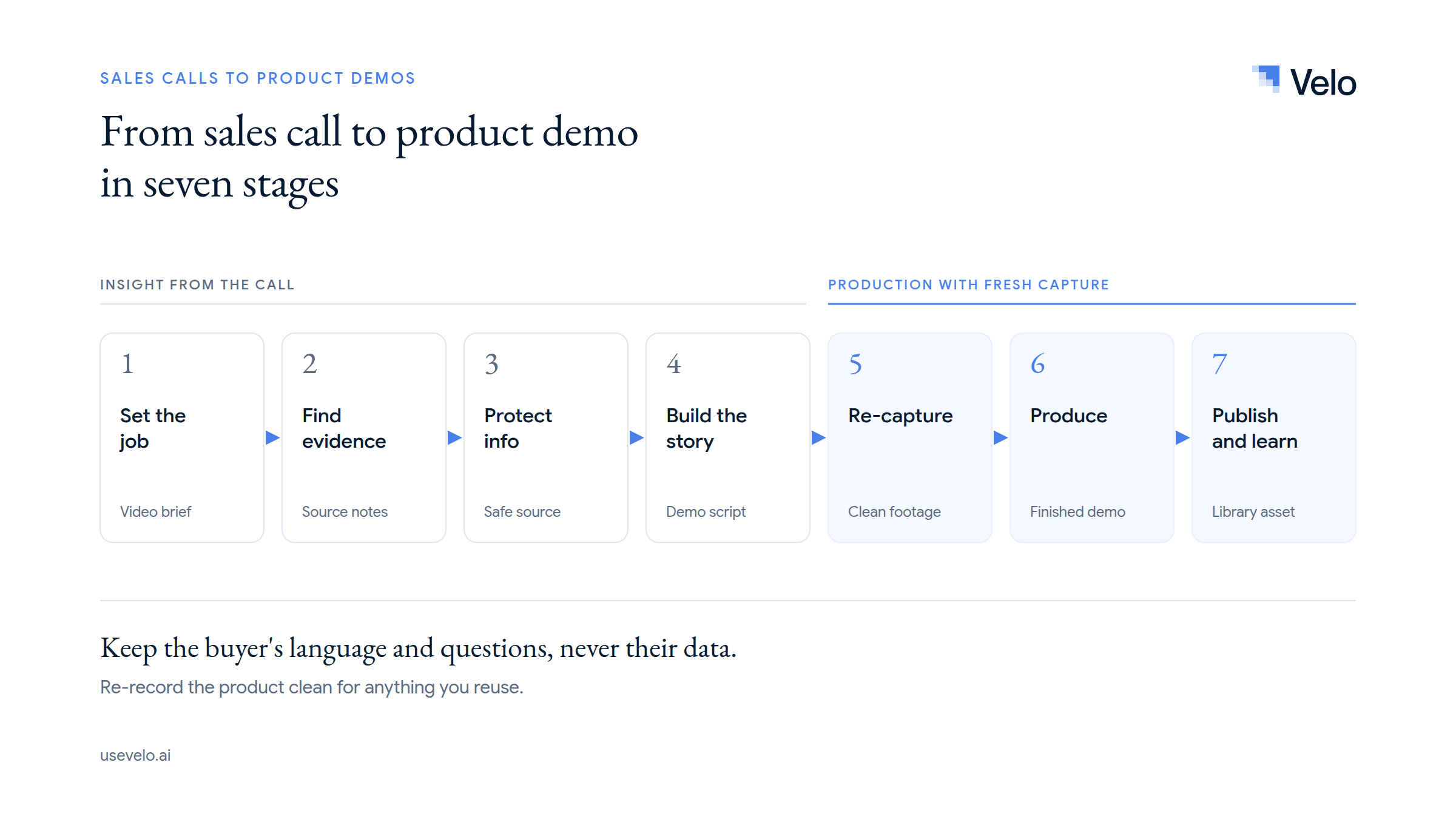
This seven-stage system separates insight from production. That matters because a recorded call often contains useful customer language but poor video: small shared screens, participant tiles, interruptions, account data, and a path through the product that only makes sense in the live conversation.
A sales call recording is raw research, not a finished demo
A live call is designed for interaction. A product demo video is designed for clarity. The same recording can inform both, but the final outputs should not be confused.
During a sales call, the presenter changes direction, answers side questions, repeats information, waits for pages to load, and may show a customer’s account. Those moments can build trust in the meeting. They usually create friction in an evergreen demo.
The call is most valuable for four kinds of product context:
- Customer language: How buyers describe the problem in their own words.
- Decision criteria: What the buyer must understand before moving forward.
- Objections: Security, implementation, integrations, price, migration, or adoption concerns.
- Proof moments: The product actions that produce an audible “that would help” response.
The goal is not to make the call look prettier. It is to convert what the call taught you into a cleaner product demo video for the next viewer.
Before you begin: permission, privacy, and source quality
Do not upload or repurpose a call recording until the team has confirmed that it can lawfully and appropriately use the material.
Recording consent rules vary by location. Gong’s consent documentation notes that some regions require one participant’s consent while others require all participants to be informed and choose whether to continue. Zoom’s recording notification guidance also describes participant notifications and administrator controls.
Those platform settings are not a substitute for legal review, and nothing in this guide is legal advice. Follow applicable law and company policy. Also distinguish between two permissions:
- Permission to record a private sales conversation.
- Permission to reuse a person’s name, voice, image, company information, or statements in another asset.
A participant may agree to the first without agreeing to the second. For an external or reusable video, remove personal and confidential details unless the relevant parties have explicitly approved their use.
Before production, confirm:
- The recording and transcript are stored in an approved system.
- Reuse is allowed for the intended audience.
- Customer names, employee details, email addresses, dashboards, contracts, and credentials are removed or redacted.
- The product behavior shown is still accurate.
- The recording contains enough signal to justify repurposing.
If the call is mostly discovery with little product discussion, use its insights to write a brief. Do not force it into a demo.
Step 1: Define the job of the new product demo video
Why this matters: A single call can produce many possible assets, but one short video cannot serve all of them well.
Do this: Write a one-sentence brief that names the viewer, the situation, and the decision the video should support.
Use this formula:
For [specific viewer] who needs to [job], show how [workflow] produces [outcome], so they can [next decision or action].
Example:
For revenue operations leaders comparing forecasting tools, show how a manager identifies a slipped deal and updates the forecast, so they can decide whether the workflow fits their weekly review.
This is more useful than “make a shorter version of Tuesday’s demo.” It gives the editor a boundary. It also determines whether the output should be a personal follow-up, an evergreen sales asset, or an internal enablement clip.
Expected result: A brief with one audience, one problem, one workflow, and one next step.
If it fails: The brief is probably too broad. Split “overview, setup, analytics, integrations, and security” into separate videos.
Step 2: Extract the moments that reveal buyer intent
Why this matters: AI can summarize a transcript quickly, but a generic summary often misses why a particular moment mattered to the deal.
Do this: Transcribe the call, then tag moments using five labels:
| Tag | What to find | How it helps the demo |
|---|---|---|
| Problem | Current friction or cost | Opens with a relevant situation |
| Outcome | Desired business result | Gives the video a destination |
| Question | What the buyer needs clarified | Determines what the video must explain |
| Objection | Reason the buyer may not act | Shapes proof and qualification |
| Product moment | Feature or workflow that changed understanding | Identifies what deserves screen time |
Ask AI to return the exact timestamp, a short paraphrase, the speaker role, and why the moment matters. Do not ask it to “find the best clips” without criteria. That usually rewards emotionally expressive moments rather than decision-relevant ones.
Then have the account owner review the output. The rep knows whether a comment was a real buying signal, a polite response, or a question that has already been resolved.
Expected result: Five to ten source notes, not thirty minutes of clips.
If it fails: Tighten the instruction around the buyer’s stated priority and exclude internal discussion, introductions, scheduling, and unrelated features.
Step 3: Remove confidential and deal-specific material
Why this matters: The most useful product moment may sit beside data that cannot appear in another customer’s video.
Do this: Review both the spoken transcript and every visible frame selected as source material. Flag:
- Customer and prospect names
- Email addresses and contact details
- Pricing, contract, and discount information
- Internal dashboards or forecasts
- Personal data
- Login credentials, tokens, and API keys
- Roadmap information and unannounced features
- Claims that apply only to one account configuration
The safest reusable workflow is usually to keep the insight and replace the original footage. Recreate the workflow in a clean demo environment with synthetic or approved data. If a direct quote or participant clip is valuable, obtain specific approval for that use.
Do not rely on automatic redaction alone. AI can miss small text, a briefly opened menu, reflected information in a browser tab, or context that only a product expert recognizes as sensitive.
Expected result: An approved source package containing only the insights and evidence the production team can use.
If it fails: Stop production and ask the appropriate legal, security, or account owner to decide. Do not guess.
Step 4: Turn discovery insight into a focused demo script
Why this matters: A call transcript follows a conversation. A strong sales demo follows the viewer’s decision.
Do this: Rebuild the useful material into five beats:
- Context: Name the situation the viewer recognizes.
- Problem: Explain the friction without exaggeration.
- Workflow: Show the minimum product path needed to solve it.
- Result: Make the operational or business change explicit.
- Next step: Tell the viewer what to evaluate or do next.
For the revenue operations example, the script might become:
Forecast reviews become unreliable when a manager cannot see which deals changed and why. In this workflow, the manager opens the forecast, filters for late-stage opportunities with no recent activity, reviews the risk signal, and updates the commit category. The team now enters the weekly review with the same evidence. Next, compare the workflow with your current review process and decide which fields your team would need.
Notice what is missing: greetings, a company history, unrelated features, and the buyer’s private data.
AI can draft this structure from selected transcript moments and approved product documents. A subject-matter expert must verify every feature, integration, number, and promise. If the call contains an assumption rather than a confirmed fact, the script should not upgrade it into a claim.
For more help shaping the live narrative, use this guide to conducting a sales demo.
Expected result: A script that can be read in two to four minutes and still makes sense without the original call.
If it fails: Remove any sentence that does not help the viewer understand the problem, workflow, result, or next step.
Step 5: Replace meeting footage with clean product capture
Why this matters: The strongest final video usually preserves the buyer insight but re-records the product.
Do this: Open a current demo environment and capture only the approved workflow. Use realistic sample data, hide unrelated browser tabs, enlarge important interface elements, and pause after meaningful actions.
There are three production options:
- Manual screen recording: Best when a presenter needs to adapt the path while recording.
- Guided recording: Best when a tool can follow a planned sequence but a human remains in control.
- Agentic browser capture: Best when a repeatable browser workflow can be described, verified, and re-run.
Velo’s Browser Agent 2.0 is designed for the third approach. A user describes the workflow and the intended takeaway, then the agent clicks, types and verifies each step in the actual product and records clean, narrated footage. A human should still review every click and screen before publication, and some login or access steps may need a manual handoff. Because the capture can be re-run, auto-updating demos keep the same video accurate after the next release.
If the original recording already contains clean, current, approved footage, reuse it selectively. This guide to polishing screen recordings explains when cleanup is enough and when re-capture is the better decision.
Expected result: Product footage that can stand on its own without participant tiles, interruptions, or account-specific context.
If it fails: Simplify the workflow or record it in smaller sections. One clean step per clip is easier to correct than a perfect five-minute take.
Step 6: Use AI to edit, narrate, caption, and brand the video
Why this matters: AI saves time when it handles repeatable production work, but the message still needs a responsible owner.
Do this: Combine the approved script and product footage, then use AI selectively for:
- Removing pauses, repeated takes, and off-topic sections
- Matching scenes to script beats
- Generating or cleaning narration
- Adding captions and correcting terminology
- Applying approved fonts, colors, logo, and layouts
- Creating alternate aspect ratios or shorter versions
- Translating approved videos for other markets
Velo’s AI Editor brings script, scenes, narration, captions, and timing into one timeline and takes plain-language changes, with every edit saved as a version. Brand Kit pulls your logo, colors and fonts from your website and applies them to every video, instead of rebuilding the look for each deal. Multilingual output translates an approved demo into 25+ languages for other markets.
AI narration is useful when the original call audio includes multiple speakers, interruptions, weak microphones, or private information. If the follow-up should come from the rep, Velo’s Record Yourself turns one teleprompter take into a multi-shot video that cuts between the rep and the product, with their real face and voice. A cloned voice or avatar (such as Avatar Generation v2) should only be used with the speaker’s permission and in line with company policy.
Keep product text readable. Avoid decorative zooms that create motion without meaning. Use a zoom, highlight, or pause only when it helps the viewer notice an action or result.
Expected result: A clear, branded demo with accurate captions and no unnecessary call residue.
If it fails: Review the video without sound. If the workflow is confusing, the visual sequence needs work. Then listen without watching. If the logic is unclear, revise the script or narration.
Step 7: Review, publish, and learn from viewer behavior
Why this matters: A video is not complete when it renders. It is complete when the intended viewer can understand and act on it.
Do this: Run three reviews before publishing:
- Product review: Is every screen, feature, and claim current?
- Privacy review: Is all customer, prospect, and internal data approved?
- Buyer review: Does the video answer the original decision question quickly?
Then publish the video in the right format:
- A private link for one account
- A CRM or sales engagement follow-up
- A reusable sales video in the enablement library
- A written help doc or leave-behind created from the same video with video to doc
- An embedded video on a product or solution page
- A short internal clip explaining an objection or competitive question
Track behavior that can improve the asset: opens, watch depth, completion, drop-off point, replies, meetings booked, and whether the viewer took the intended next step. Video analytics can show whether a demo was watched and where attention changed, but interpretation still matters. A low completion rate might mean the video is too long, or it might mean the viewer found the required answer early.
Expected result: A published asset with an owner, a destination, and a review date.
If it fails: Return to the brief. Distribution cannot rescue a video that answers the wrong question.
Three useful outputs from one sales call
The same call can support different videos when each output has a separate job.
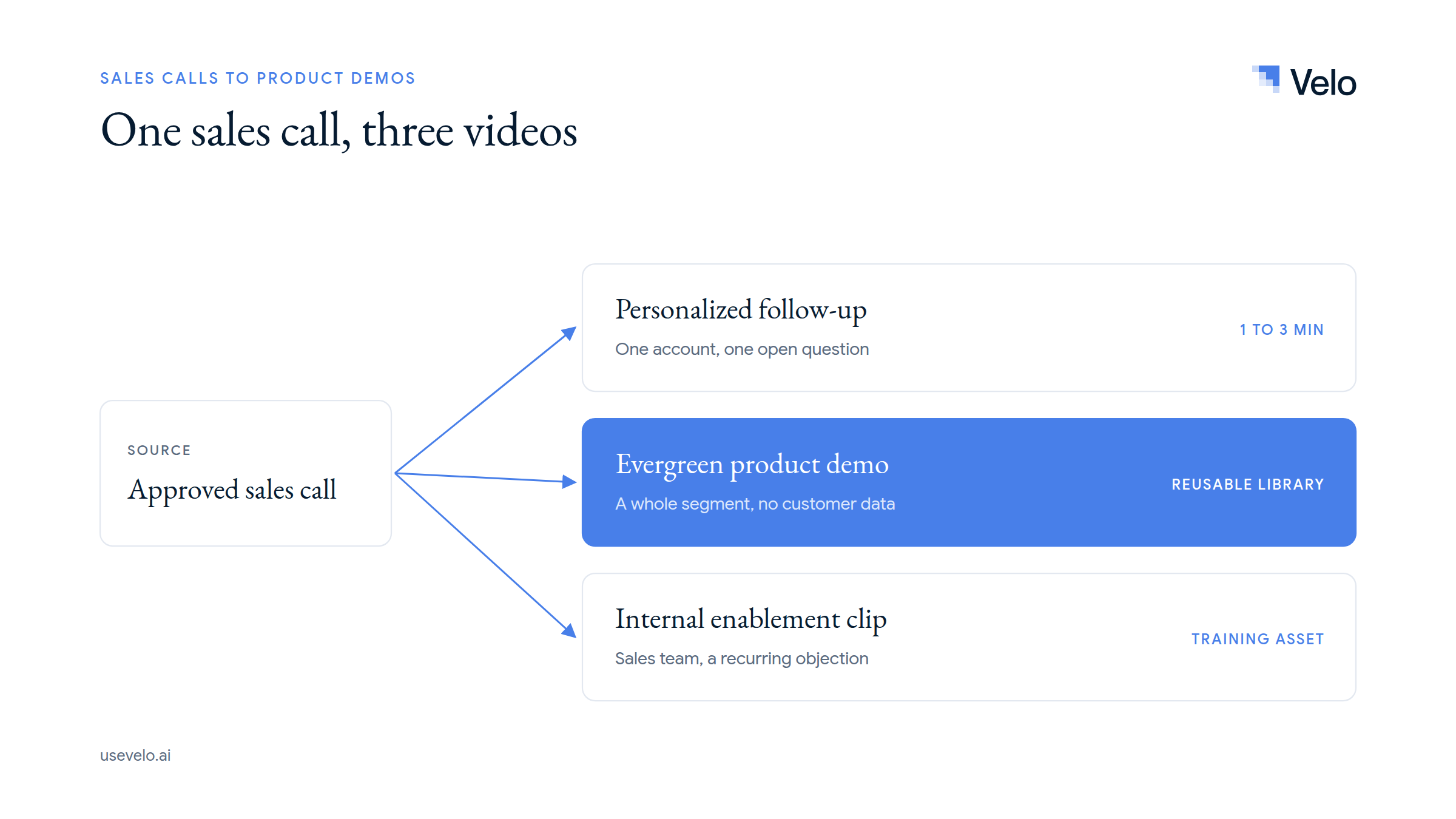
One approved sales call becomes three videos: a personalized follow-up, an evergreen product demo and an internal enablement clip
1. A personalized follow-up demo
Use the buyer’s approved context and focus on one unresolved question. Keep the video short, acknowledge the specific workflow, and end with a concrete next step. This output is deal-specific and may have a short useful life. Our personalized sales videos playbook covers how to scale this format.
2. An evergreen product demo
Remove account-specific details and build the video around a recurring problem shared by a segment. Use clean demo data and current product footage. This output belongs in a reusable product demo or sales demo video library.
3. An internal enablement clip
Show sales teams how to answer a recurring question or demonstrate a difficult workflow. This can include more context than an external video, but confidential customer material still needs protection.
Do not publish three near-identical edits with unclear ownership. Give each video a named audience, stage, and next action.
A worked example: from a 42-minute call to a 2-minute demo
Imagine a sales team selling a data-quality platform. In a 42-minute discovery and demo call, the prospect asks how operations leaders can identify broken records before they reach the warehouse.
The call contains four useful inputs:
- The prospect describes a weekly manual audit.
- The buyer asks whether alerts can be filtered by data source.
- The rep shows a noisy five-minute workflow with two detours.
- The prospect confirms that routing an issue to the source owner would reduce investigation time.
The reusable video should not summarize all 42 minutes. It should become:
- Context: Operations teams often discover data issues after downstream reports break.
- Workflow: Open the alert queue, filter by source, inspect the failed rule, and assign the issue to the owner.
- Result: The right person receives the evidence needed to investigate earlier.
- Next step: Compare the rule and routing model with the team’s current process.
The team re-records the four actions in a clean environment, creates a two-minute narration, adds captions and brand styling, and publishes two versions: one personalized follow-up and one generic enablement asset. The customer language informed the story, but no customer voice, identity, or data appears in the reusable version.
The Velo way: combine call insight with current product context
Velo is not a meeting recorder, a conversation intelligence platform, or a CRM. Keep using Zoom, Gong, Microsoft Teams, or another approved system to capture and govern calls.
Velo becomes relevant after the team has permission and a clear production brief. With the Unified Agent, a rep or product marketer describes the video in one chat and gives it the approved transcript, an existing recording, documents, product pages, screenshots or a prompt as product context. From there:
- Browser Agent 2.0 captures current product footage from the live product, so no call residue or customer data carries over.
- Record Yourself keeps a personalized follow-up human, with the rep’s real face and voice.
- AI Editor assembles the script, visuals, narration, captions and timing, and takes plain-language fixes.
- Brand Kit keeps every demo on brand, and translation, analytics and video to doc extend one demo across markets and formats.
This makes Velo useful when one sales conversation reveals an explanation that should become reusable across many deals. It is less appropriate when the goal is merely to clip a participant’s reaction or send the untouched call recording. For a wider view of the tool category, compare our best sales demo video tools.
Turn the lesson from the call into the next clear demo
A useful sales call contains more than footage. It contains the buyer’s language, decision criteria, objections, and proof moments. Extract those insights, protect the people and data involved, rebuild the story around one outcome, and capture the current product cleanly.
If you want to turn approved call material and product context into reusable sales demos, try Velo for free or book a demo.