Best Interactive Demo Software in 2026: 9 Tools Compared
TL;DR: the best interactive demo software in 2026
- Navattic is the strongest fit for marketing teams that want editable HTML demos and detailed engagement data.
- Storylane suits teams that want screenshot demos now and HTML capture as they scale.
- Supademo and Arcade are the fastest, most affordable ways to start with click-through demos.
- Velo is best for teams that need narrated product demo videos an agent can record and refresh as the product changes. It is video-first, not a click-through builder.
- Consensus is built for sales-led demo automation and buying groups, and Reprise is the enterprise choice for realistic sandboxes and full application clones.
Buyers want to understand a product before they agree to a sales call. The problem is that every release can make a carefully built tour inaccurate. The best interactive demo software lets prospects explore a guided version of your product without waiting for a live presentation, while giving your team a practical way to keep that experience current.
This guide compares nine tools across click-through demos, editable HTML replicas, sandboxes, demo automation and video. Velo is best for product and GTM teams that want an agent to record a narrated product walkthrough and refresh it when the product changes. Where a true interactive demo platform is the better choice, we say so.
Disclosure: Velo publishes this guide and is one of the tools covered. Prices were checked on each vendor’s official pricing page on October 7, 2026.
Interactive demo software at a glance
| Tool | Demo format | Best for | Standout feature | Main limitation | Starting price | Free plan |
|---|---|---|---|---|---|---|
| Navattic | HTML and media click-through | Marketing-led website demos | Editable HTML captures and analytics | Paid plans are quote-based, billed annually | $0; paid by quote | Yes |
| Storylane | Screenshot, video and HTML | Sales and marketing teams | Several capture formats in one platform | HTML starts on Growth | $0; Starter $40/mo yearly | Yes |
| Arcade | Screenshot, video and interactive | Fast, polished storytelling | AI demos, video and visuals | HTML capture is Enterprise-only | $0; Growth $42.50/seat/mo yearly | Yes |
| Velo | Narrated video | Product demos that need narration and updates | Browser Agent 2.0 and auto-updating demos | Not a click-through builder | $0; Pro $49/mo | Yes |
| Supademo | Screenshot, video, HTML and sandbox | Affordable cross-team demos | Fast capture with broad output options | HTML starts on Business | $0; Scale $38/creator/mo yearly | Yes |
| Guideflow | Screenshot, mobile, HTML and sandbox | Teams growing from tours to sandboxes | Wide range of demo formats | HTML starts at $499/mo yearly | $0; Solo $35/mo yearly | Yes |
| Consensus | Video, tours, simulations and live demos | Enterprise presales and demo automation | Buyer-level engagement data | Packages are quoted by sales | From $600/mo | No |
| Walnut | HTML demos, playlists and sandboxes | Enterprise sales personalization | Reusable templates and buyer experiences | High annual entry cost | $575/mo billed annually | No |
| Reprise | Guided demo, clone, sandbox and live overlay | Complex enterprise products | Full application cloning | Quote-based enterprise purchase | Custom | No |
Annual rates are shown as monthly equivalents where the vendor publishes them. Seats, creators, AI credits and billing cycles change the real total, so confirm the checkout price before you buy.
What is interactive demo software?
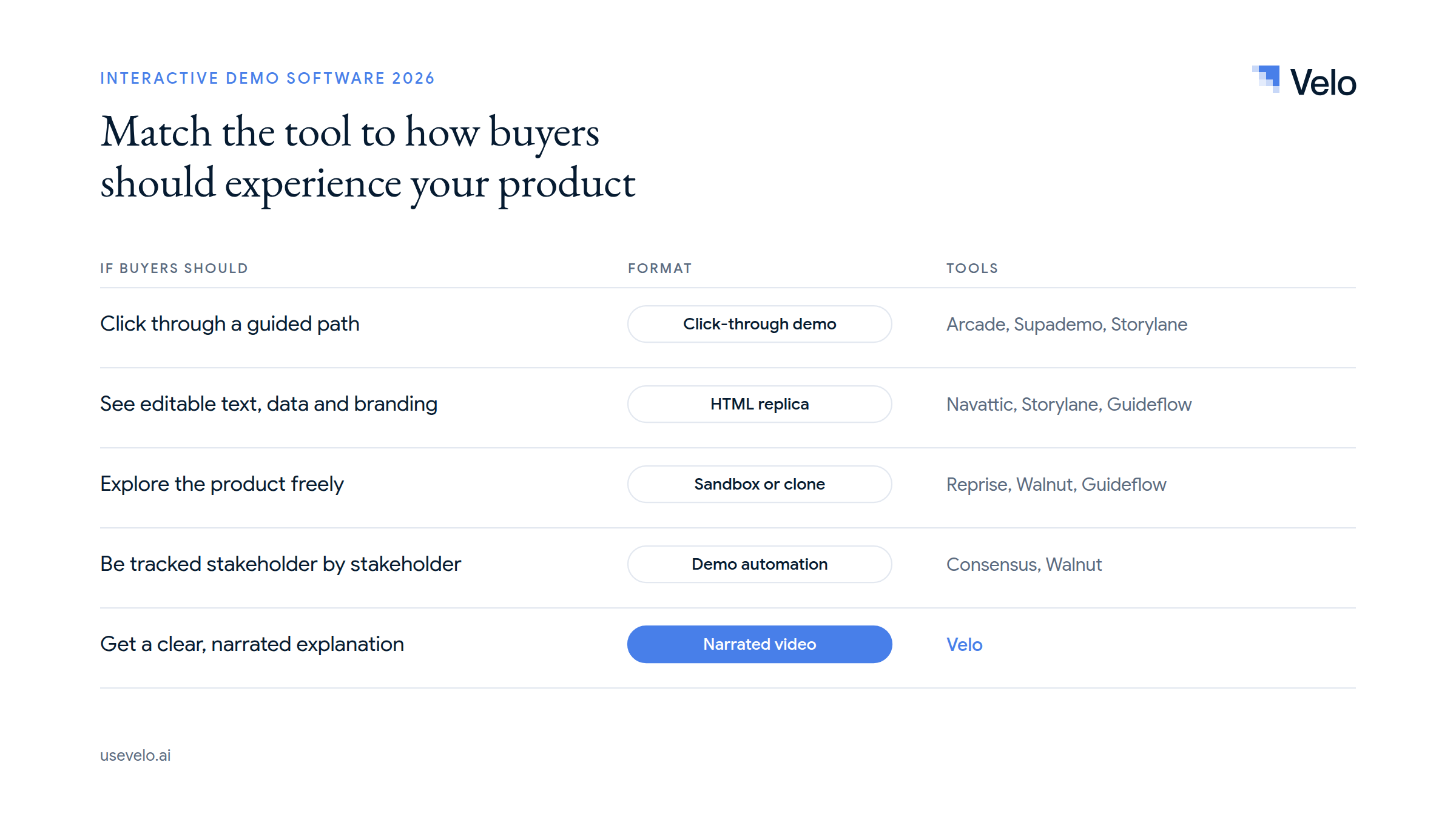
Interactive demo software creates a self-guided product experience that a prospect can explore without logging into your live application. You’ll also see it called product tour software, guided tour software or app walkthrough software. The category covers several formats that solve different problems:
- Click-through demo (interactive product tour): captured screens with hotspots and tooltips guide a viewer along a defined path.
- HTML demo: captures editable interface elements, so teams can change text, data and branding without touching production.
- Sandbox demo: recreates more of the product and allows freer, less linear exploration.
- Demo automation platform: distributes demos through sales workflows and measures buyer activity.
- Video demo (product walkthrough video): controls the pace with narration and works well for launches, follow-ups, onboarding and support. It is watchable, not clickable. Tools that make these are usually called product demo video software.
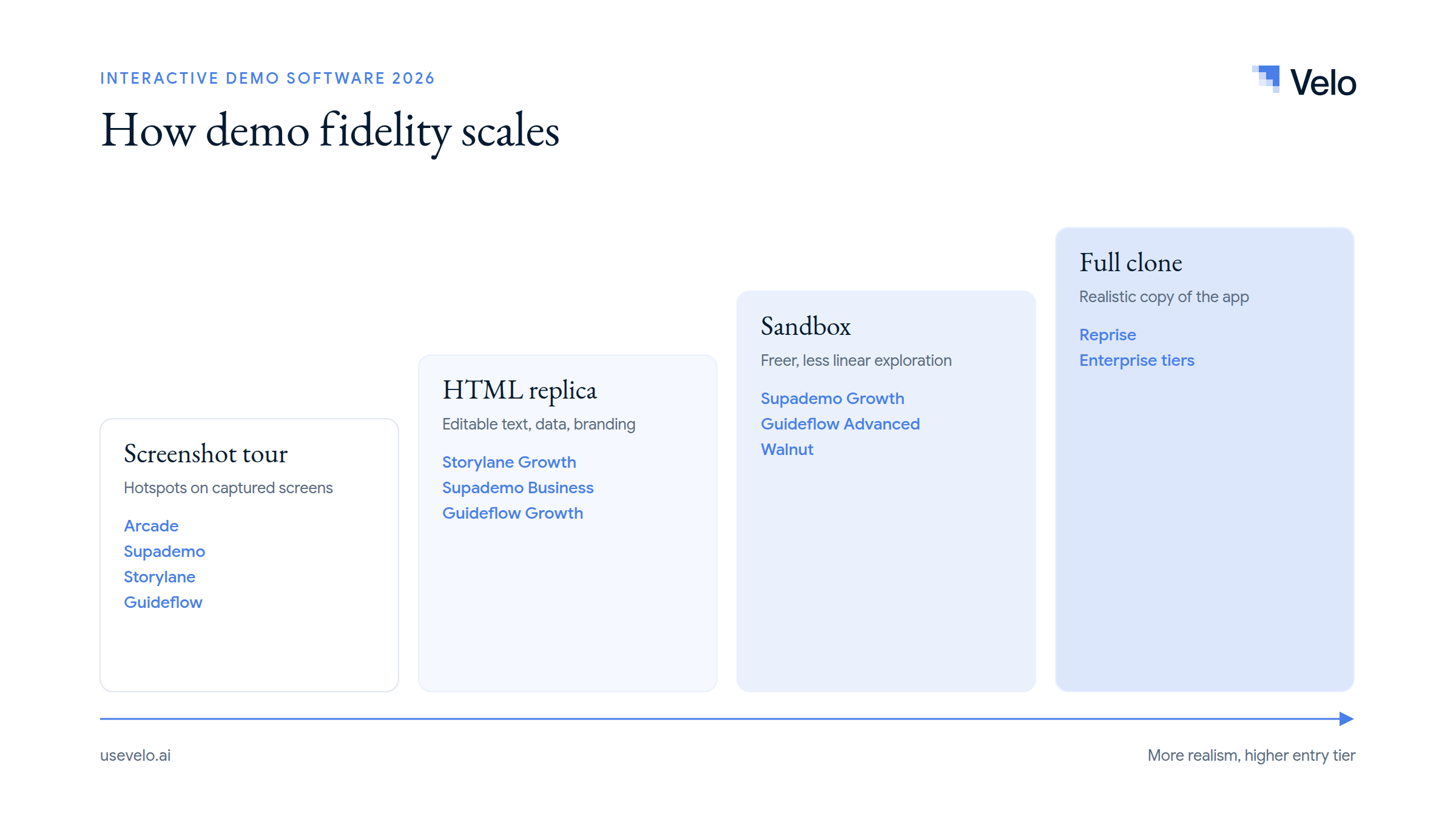
That distinction matters. If a buyer must explore branching paths or manipulate sample data, choose interactive product demo software. If your team needs to explain a workflow clearly in two minutes, a narrated video may be the more useful asset. Our guide to product demos, types and scripts covers that format in more depth.
How we evaluated these interactive demo tools
We reviewed each vendor’s official product documentation and pricing page against the same six criteria: setup effort, editing control, personalization, analytics, update workflow and total entry price. We did not run hands-on tests across all nine products.
For your own shortlist, run one shared test: build the same five-step workflow in every free plan or trial, publish it, change one interface label, and measure how long the update takes. That test exposes differences a feature checklist misses, especially if your product ships every week.
The 9 best interactive demo software tools
1. Navattic
Navattic is an HTML-first interactive demo platform for marketing, sales and presales teams.
Best for: Marketing teams that want a realistic product experience embedded on their website.
Pros:
- Captures web apps as editable HTML, including pages behind a login.
- Lets teams change data, text, images and other interface details without altering the live product.
- Supports lead capture, A/B testing, account identification, CRM workflows and engagement analytics.
- Recapture helps when one screen appears in several demos, and higher tiers add AI voiceovers, avatars and sandbox demos.
Limitations / trade-offs: Navattic is built for structured, self-guided exploration, not narrated video. Native desktop products are represented with media captures rather than editable HTML. Paid plans are aimed at teams with a real demo program, not an occasional solo creator.
Pricing: The free Starter plan includes one seat and one HTML or media demo. Base (5 seats) and Growth (10 seats) are billed annually and quoted on request; Navattic’s pricing page does not list a dollar figure. Enterprise is custom, and there’s a startup program for seed-stage teams.
Verdict: Choose Navattic when website conversion, editable HTML and detailed prospect behavior matter more than narration. See Velo or Navattic for a format-level comparison.
2. Storylane
Storylane combines simple screenshot tours with HTML demos, hubs and sales-oriented distribution.
Best for: Teams that want to start with screenshot demos and add editable HTML later.
Pros:
- Supports screenshot and video demos on entry plans, with HTML capture from Growth.
- Includes lead capture and basic analytics on the free plan.
- Adds integrations, branding, personalization and sales hubs as teams move upmarket.
- A familiar no-code editor that marketing and sales contributors pick up quickly.
Limitations / trade-offs: Starter does not include HTML capture. Storylane’s most differentiated features sit on Growth and above, so price the plan that matches the demo format you need rather than comparing entry prices alone.
Pricing: Free is $0. Starter is $50 per month ($40 billed yearly), Growth is $625 per month ($500 billed yearly), and Premium is $1,500 per month ($1,200 billed yearly), per Storylane’s plans page. Enterprise is custom.
Verdict: Storylane is a practical path from lightweight product tours to a bigger demo program. For a format comparison, see Velo or Storylane.
3. Arcade
Arcade is a polished storytelling platform for interactive demos, videos and generated visuals.
Best for: Product marketing teams that value fast creation and visual finish.
Pros:
- Creates interactive demos from captured workflows and also produces AI video and visuals.
- Includes AI voiceovers on Free, then translations, branching, calls to action, forms and exports on Growth.
- Chrome, desktop and Figma capture options.
- Strong presentation controls for demos on websites, social channels and campaigns.
Limitations / trade-offs: HTML capture is reserved for Enterprise, so Growth users work mainly with screenshot and video experiences. Generated videos and visuals use AI credits (videos cost 50 credits per 30 seconds), even though demos themselves are credit-free.
Pricing: Free is $0 with one published demo, one published video and 200 AI credits a month. Growth is $50 per seat per month or $42.50 billed yearly, with 800 credits a month, per Arcade pricing. Enterprise is custom.
Verdict: Arcade is a strong choice for attractive, fast-moving marketing stories. Read Velo vs Arcade if you’re deciding between interactive storytelling and narrated product video.
4. Velo
Velo is an AI video platform for work and product demo video software that turns product context into narrated product demos you can keep current. It is the one video-first tool on this list, included because many teams evaluate it alongside product tour software.
Best for: Product and GTM teams that want polished video walkthroughs from a live product, recording, document, deck, URL or prompt, and need them to stay accurate after every release.
Pros:
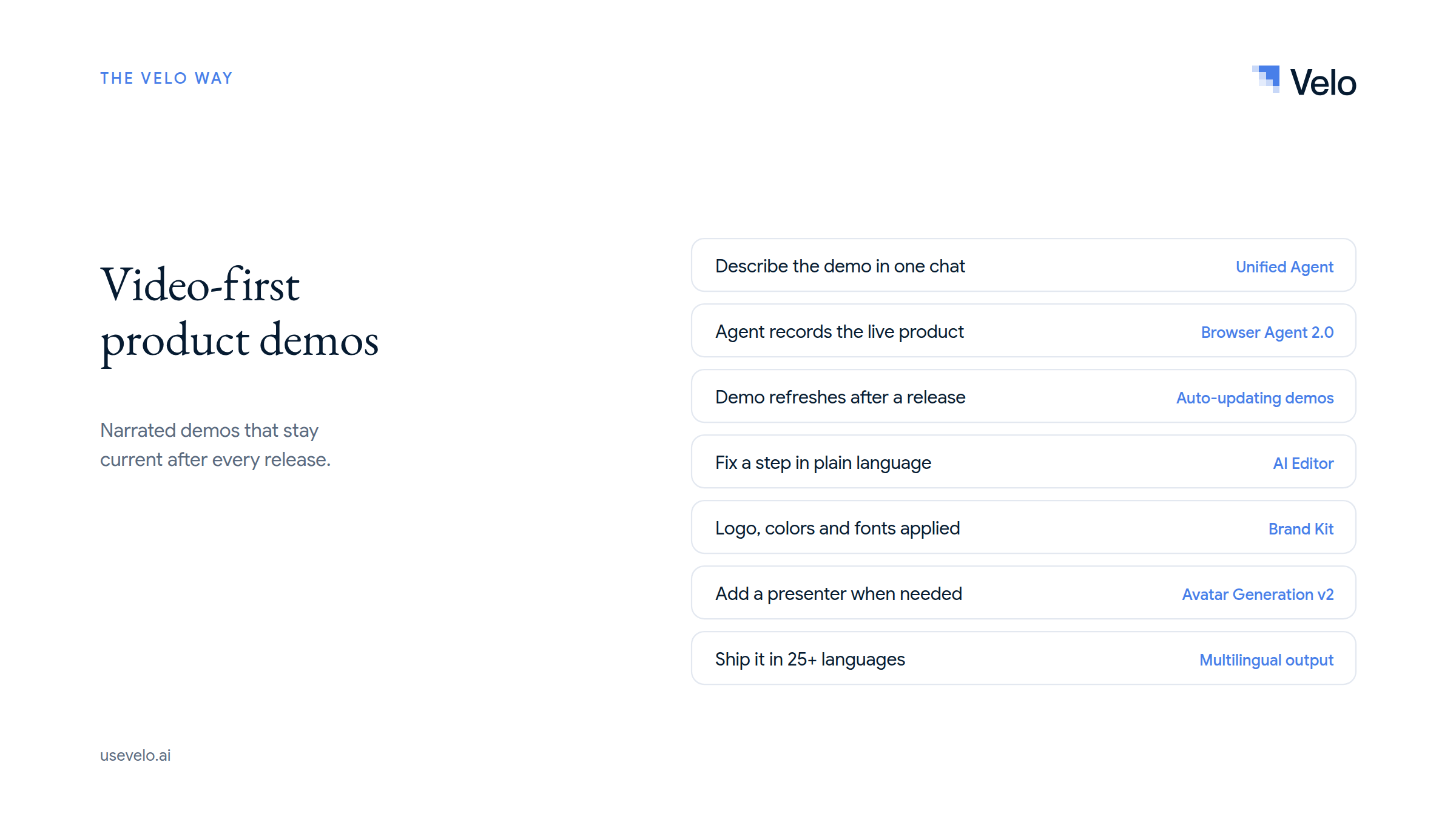
- Browser Agent 2.0 drives your live web product from a plain-language task, verifies each step, and cuts waiting and retries for a clean walkthrough.
- Auto-updating demos refresh a workflow against the product instead of forcing a complete re-record.
- The Unified Agent builds any type of video from one chat, and the AI Editor lets you fix a single frame in plain language with every edit saved as a version.
- Brand Kit applies your logo, colors and fonts automatically, Record Yourself or Avatar Generation adds a presenter, and one click translates the video into 25+ languages.
- One source can feed launch, sales, onboarding and help-center versions.
Limitations / trade-offs: Velo is not interactive demo software in the strict sense. Viewers watch a video rather than click through a simulated product. Usage is metered by credits, and Browser Agent may need a manual handoff for logins and other sensitive steps.
Pricing: Free is $0 with 1,500 credits a month (roughly 2 to 5 minutes of video). Pro is $49 per month ($41 billed yearly) and Ultra is $200 per month ($167 billed yearly). Enterprise is custom, per Velo pricing.
Verdict: Pick Velo when a clear narrated explanation and fast maintenance matter more than viewer-controlled exploration. Many teams pair it with a click-through tool: the interactive demo on the website, the narrated video in sales follow-ups, launches and the help center.
5. Supademo
Supademo is a flexible demo platform spanning guided tours, recordings, HTML demos and sandboxes.
Best for: Small and mid-sized teams that want an affordable route into several demo formats.
Pros:
- The free tier includes five guided demos and 50 video recordings.
- Scale adds branching, variables, analytics, Supademo AI and team collaboration.
- Business unlocks guided HTML demos, and Growth adds sandbox demos, AI voice cloning and versioning.
- Share as a link, embed, video or PDF.
Limitations / trade-offs: The low entry price covers screenshot and video workflows, not HTML or sandboxes. Map your desired output to the right tier, and note that per-creator billing adds up as the authoring group grows.
Pricing: Free is $0. Scale is $50 per creator per month or $38 billed yearly. Business is $249 per month ($199 billed yearly), and Growth is $450 per month ($350 billed yearly) with five creators, per Supademo pricing. Enterprise is custom.
Verdict: Supademo offers broad coverage at a useful entry point. Velo vs Supademo explains when click-through content or narrated video fits better.
6. Guideflow
Guideflow covers screenshot tours, mobile demos, HTML captures and sandbox experiences.
Best for: Teams that want a clear upgrade path from basic demos to higher-fidelity environments.
Pros:
- Free and Solo support screenshot and mobile demos.
- Solo adds advanced analytics, lead forms, AI copy, translation and video or GIF export.
- Growth introduces HTML capture, editing, personalization, branching and a demo library.
- Advanced adds sandbox demos, offline use, custom domains and presenter features.
Limitations / trade-offs: The biggest capability jump is also a big price jump. HTML demos start on Growth and sandboxes on Advanced. Teams that only need simple product tours may not use the wider platform.
Pricing: Free is $0. Solo is $35 per month billed yearly ($40 monthly), Growth is $499 per month billed yearly ($599 monthly), and Advanced is $1,499 per month billed yearly ($1,799 monthly), per Guideflow pricing. Enterprise is custom.
Verdict: Guideflow makes sense when several demo formats will live in one program. Considering a format change? Read moving off Guideflow.
7. Consensus
Consensus is an enterprise demo automation platform for presales, sales and buying groups.
Best for: Revenue teams that want video, tours, simulations and live-demo signals inside the sales process.
Pros:
- Combines interactive tours, video, AI demo agents and live demo workflows.
- Shows sellers and presales teams which stakeholders engaged and what they cared about.
- Fits account-based, multi-stakeholder buying where demo engagement becomes sales intelligence.
- Distributes demos throughout the deal, not just on a website.
Limitations / trade-offs: Consensus is a sales platform, not a lightweight demo maker, so it can be more than a small marketing team needs for a public tour. There’s no self-serve free plan, and packages are quoted by sales.
Pricing: Consensus pricing starts at $600 per month, with packages tailored through sales.
Verdict: Choose Consensus when the demo is part of an enterprise revenue workflow and engagement data must reach the sales team.
8. Walnut
Walnut creates reusable interactive demo templates, playlists, sandboxes and deal experiences for sales teams.
Best for: Enterprise sales organizations that personalize demos across many accounts.
Pros:
- Builds unlimited demos from reusable templates.
- Connects demo activity with CRM and marketing systems.
- Accelerate adds sandboxes, prospect personalization, advanced analytics and sales or customer hubs.
- Plans include editor and presenter seats plus an annual pool of AI credits, so the commercial model is clear.
Limitations / trade-offs: No free tier, and plans are sold annually. The entry price is far higher than self-serve click-through tools, so the value depends on using personalization and analytics across a real pipeline.
Pricing: Ignite is $575 per month billed annually (3 editor and 3 presenter seats, 50,000 AI credits), and Accelerate is $1,550 per month billed annually (6 and 6 seats, 100,000 credits), per Walnut pricing. Scale is custom.
Verdict: Walnut is strongest when demos are personalized sales assets, not one-off marketing tours. See Velo vs Walnut for where video fits alongside it.
9. Reprise
Reprise is an enterprise demo platform for guided experiences, full application clones and complex sandboxes.
Best for: Large presales teams demonstrating products that can’t be shown safely or reliably in production.
Pros:
- Full application cloning and realistic sandbox environments.
- Guided demos, data injection, analytics, integrations, offline mode and enterprise access controls.
- Reusable variables and templates help large teams standardize demo environments.
- SSO and role-based access are part of the platform.
Limitations / trade-offs: Built for complex enterprise programs, so procurement, implementation and authoring take more effort than a screenshot tour. No self-serve entry price.
Pricing: Custom quotes through Reprise.
Verdict: Reprise is the shortlist choice for realistic, controlled product environments at enterprise scale.
How to choose an interactive demo platform
- Marketing-led website experience: Start with Navattic, Storylane, Arcade or Supademo, and decide whether you need editable HTML or a faster screenshot workflow.
- Small team, limited budget: Test the free plans from Storylane, Arcade, Supademo, Guideflow and Navattic on the same workflow.
- Enterprise sandboxes: Compare Reprise, Walnut, Guideflow Advanced and Supademo Growth.
- Sales-led demo automation: Consensus and Walnut tie the demo to account activity and sales workflows.
- Frequent product releases: Test the real update path. Navattic offers screen recapture, Walnut uses templates, and Velo refreshes narrated demos with Browser Agent 2.0 and auto-updating demos. Our auto-updating demos guide shows how that works.
- CRM and analytics depth: Shortlist Navattic, Storylane, Consensus or Walnut, then confirm the exact integration on the plan you’ll buy.
- A narrated leave-behind: Choose Velo or another video-first tool instead of forcing a click-through platform to do a video job. Start with our guide on how to make a product demo video.
The Velo way: video-first demos built from product context
Velo treats a demo as a reusable explanation, not a chain of clickable screens. A product marketer can start from a live browser workflow, a rough recording, a product page, screenshots, a deck or documentation, or just describe the video to the Unified Agent. Velo uses that product context to build a narrated, on-brand video, then lets the team revise the script, timeline, voice and branding.
This works well when the viewer should understand one outcome quickly: a launch walkthrough, a sales follow-up, a feature explanation or a help-center clip. Video also controls pace and emphasis, which helps when an unguided sandbox would overwhelm a new buyer. And when the UI changes, Browser Agent 2.0 and auto-updating demos refresh the affected workflow instead of sending someone back to re-record.
The trade-off is real: Velo doesn’t let the viewer click through a simulated interface. If hands-on exploration, editable sample data, branching or sandbox behavior is essential, pick Navattic, Storylane, Supademo, Walnut or Reprise. For many teams, Velo complements an interactive demo tool rather than replacing it.
Choose the demo format before the vendor
The best interactive demo software is the one that matches how buyers need to experience your product. Use click-through or HTML demos for guided exploration, sandboxes for realistic hands-on evaluation, and demo automation for enterprise sales workflows. Choose video when the job is to explain one outcome clearly and keep that explanation current as the product changes.
Try Velo for free or book a demo to turn your product context into a narrated walkthrough that stays up to date.