9 Best AI Video Tools for Startups in 2026
Startups rarely need one abstract “AI video generator.” They need to launch a product demo this week, turn a founder interview into clips, explain a feature without a production team, or localize onboarding before the next market opens. The best AI video tool therefore depends on the job. Velo is best for startups that need to turn their own product, docs, and workflows into demos, onboarding, and support videos without a production team. Pair it with Descript for transcript-based editing, Canva for everyday brand content, and HeyGen when an AI presenter is the format.
This guide compares nine AI video tools for startups by workflow, learning curve, collaboration, output limits, and current pricing.
Quick takeaways
- Best for product demos and reusable work videos: Velo, which keeps the real product on screen and lets you edit it afterward, all from one chat.
- Best for editing founder video by editing text: Descript.
- Best all-purpose brand content system: Canva.
- Best for fast short-form social: CapCut.
- Best for avatar-led, localized marketing: HeyGen; best for governed multilingual training: Synthesia.
- Best for remote interviews and podcasts: Riverside; best generative campaign footage: Runway; best quick async messages: Loom.
- Buy by workflow, not by feature list. Most startups need three tools, not nine.
The quick answer: match the tool to the job
| Tool | Best startup use | Useful starting point |
|---|---|---|
| Descript | Founder videos, podcasts, webinars, and text-based editing | Free; paid from $16/person/month billed annually |
| Velo | Product demos, onboarding, release videos, and support walkthroughs | Free; Pro $49/month |
| Canva | Branded social video, ads, presentations, and simple explainers | Free; Pro $180/year (about $18/month) for one person in the US |
| CapCut | Fast short-form social editing | Free entry; paid pricing varies by region and app store |
| HeyGen | AI avatar videos and localized presenter content | Free; Creator $29/month |
| Synthesia | Multilingual training and governed internal video | Free; Starter $29/month on monthly billing |
| Riverside | Remote interviews, podcasts, webinars, and repurposing | Free; Pro from $24/month billed annually |
| Runway | Generative campaign footage and visual concepts | Standard from $12/month billed annually |
| Loom | Quick async screen and webcam messages | Starter $0; Business $18/user/month |
Pricing reflects each vendor’s published plans at the time of writing. Confirm the current checkout total before you budget, since these tools change tiers, seats, and credit limits often.
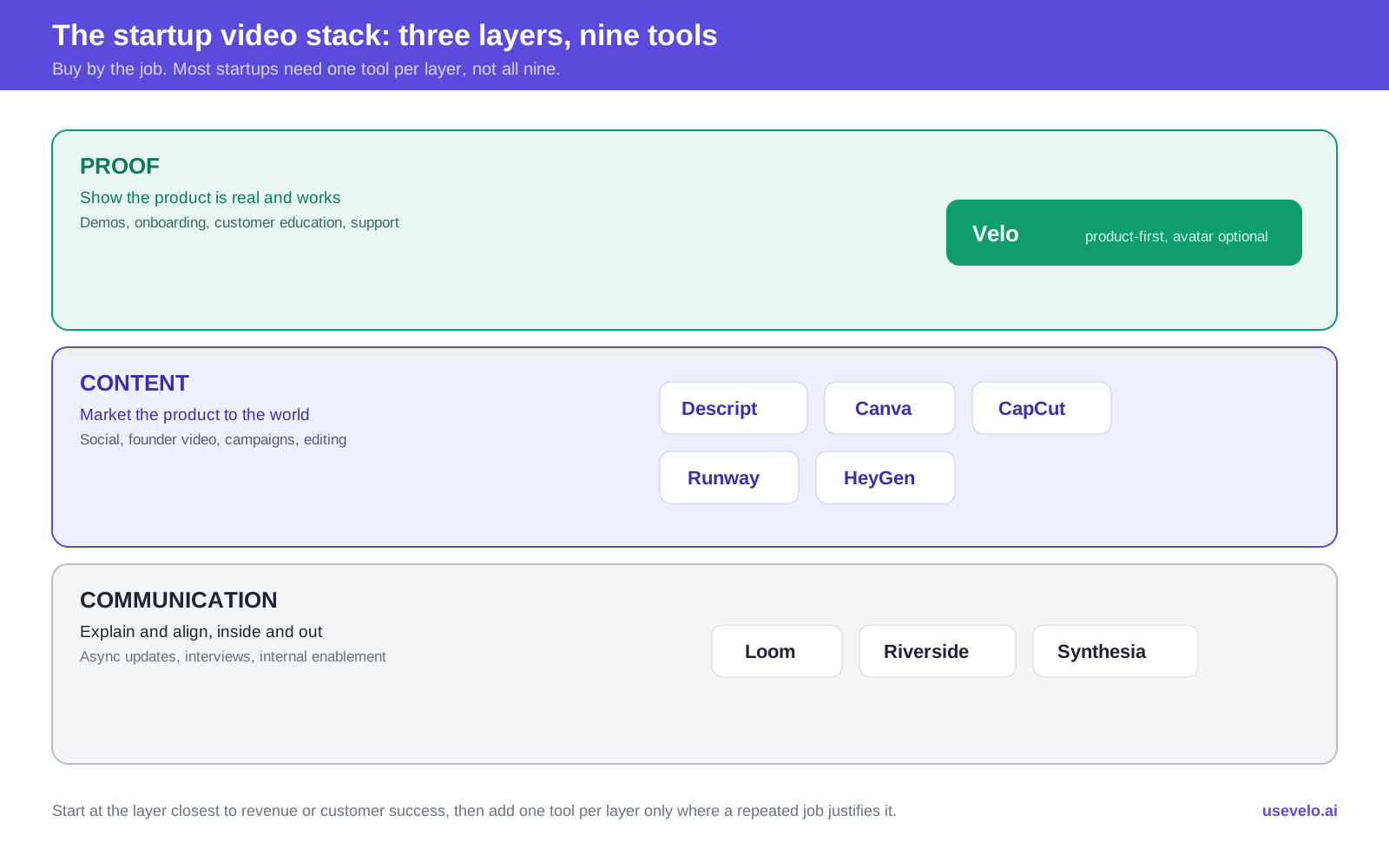
Startup video stack: nine tools mapped to Proof, Content, and Communication.
If you only choose three: use one product or workflow tool, one editor or brand tool, and one recording or specialist tool. Most startups do not need nine subscriptions.
What is an AI video tool for a startup?
An AI video tool for startups is software that uses AI to script, record, edit, narrate, translate, or generate video, so a small team can ship professional video without a dedicated production crew. In practice the category splits into four jobs: product-first tools that turn your real software into demos and onboarding, editors that speed up founder and podcast content, brand and social tools for everyday marketing, and generative tools that create footage from a prompt. No single tool wins all four, so the right pick is the one that removes your most expensive recurring step.
What should a startup look for in an AI video tool?
An early-stage company should optimize for repeatable output, not the longest feature list. A tool is valuable when someone on the existing team can use it every week without creating another operational bottleneck.
Score each option against these criteria:
- Job fit: Does it solve the exact video task you repeat?
- Time to first usable draft: Can a founder, marketer, PM, or support lead produce something publishable without specialist training?
- Source accuracy: Can the video stay grounded in the real product, an approved script, a recording, or a document?
- Editing control: Can the team correct a line, replace a screen, change timing, or apply brand rules without starting again?
- Distribution: Does it export the formats you need, or provide hosting, captions, analytics, and share pages?
- Collaboration: Are review, comments, brand kits, roles, and shared workspaces available when the team grows?
- Usage economics: Do credits, generated minutes, seats, storage, resolution, or watermark removal change the apparent price?
- Commercial terms: Are the generated media, stock assets, avatars, voices, and AI models permitted for the intended use?
The right AI video software for a startup is usually the one that removes the most expensive recurring step, whether that is recording, editing, localization, design, or scheduling. Define the bottleneck before comparing plans.
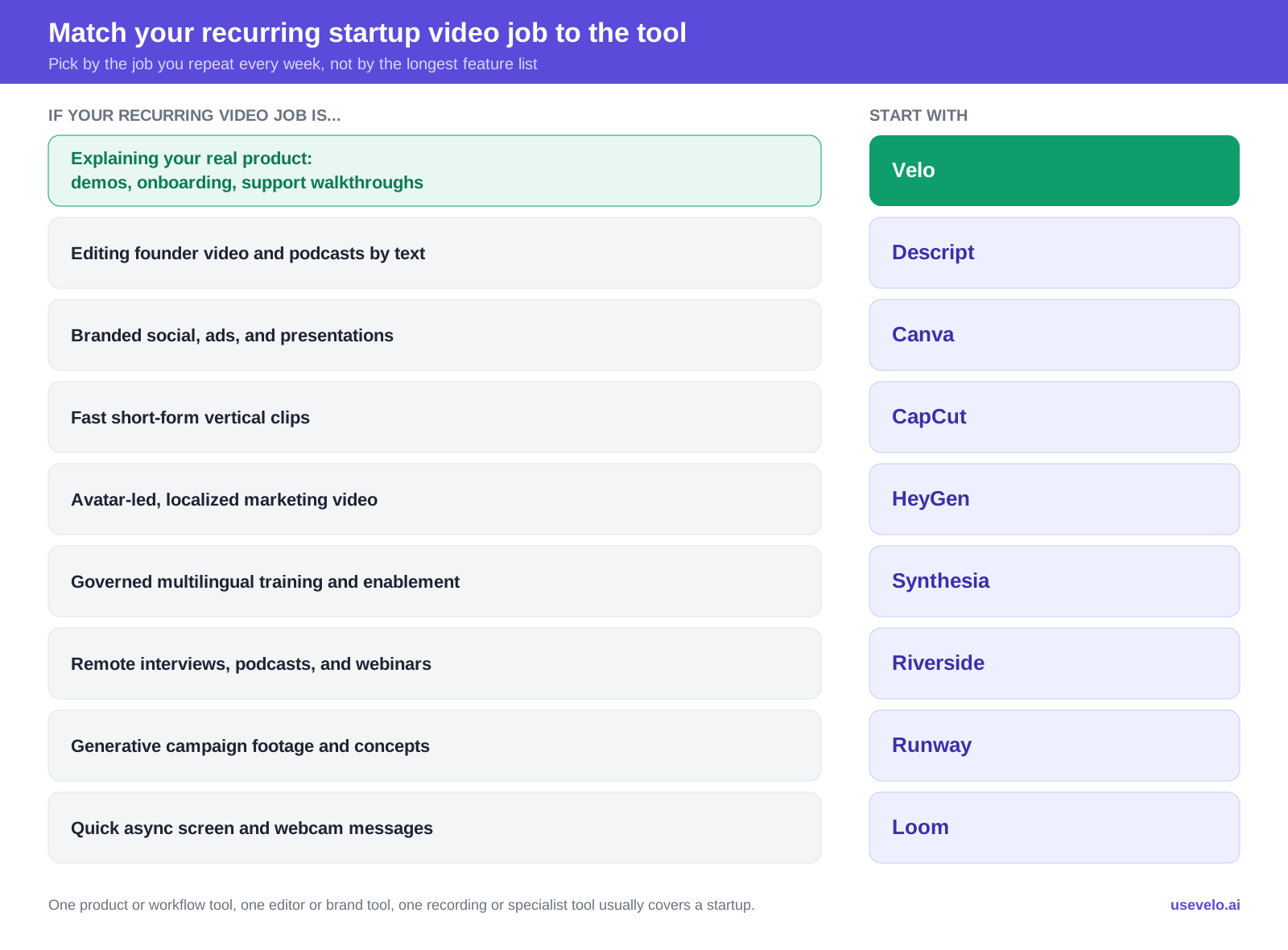
Job-to-tool map: match the video you repeat to the right tool.
1. Descript: best for editing founder-led video by editing text
Descript treats recorded audio and video like a document. Edit the transcript and the corresponding media changes with it. That makes it particularly useful for founder updates, video podcasts, customer interviews, webinars, educational content, and long recordings that must become shorter assets.
Why it fits startups
- Transcript-based editing is approachable for people who do not use traditional video timelines.
- Studio Sound, filler-word removal, eye-contact correction, captions, and clip creation speed up common cleanup.
- Screen recording and remote recording cover product and interview inputs.
- Higher plans add 4K export, more media hours, brand controls, translation, and custom avatars.
Watch for
Media hours and AI credits are separate allowances. A startup that imports many long recordings or uses generative features heavily may need top-ups or a higher tier. Descript is also an editor first. It will not automatically design a strong story from an unfocused two-hour conversation. If it is not the right fit, our Descript alternatives guide covers where teams switch.
- Best for: podcasts, founder content, webinars, customer interviews, and repurposing.
- Pricing: Free; Hobbyist $16/person/month billed annually or $24 monthly; Creator $24 annually or $35 monthly; Business $50 annually or $65 monthly.
2. Velo: best for product demos and reusable work videos
Velo is the pick when the video has to show your real product, not just talk about it. It is built for the videos a startup creates from its own product and knowledge: product demos, feature launches, customer onboarding, training, sales follow-ups, and support walkthroughs. It can start from a rough screen recording, URL, document, deck, or prompt, then turn the source into a narrated, branded video.
Why it fits startups
- Product screens and approved company material remain the foundation of the video.
- Screen-recording polish can remove pauses, steady cursor movement, and focus attention on key actions, and the browser agent can record a workflow itself from a URL when nobody wants to sit through another take.
- Teams can update scripts and affected scenes as the product changes, and the browser agent can refresh a recording on its own when the live product changes, so demos do not go stale after every release.
- Voice cloning, multilingual output, hosting, and analytics reduce the need for separate production steps.
- A founder can also just record themselves talking, teleprompter and all, and let Velo build the polished version around it.
- A video can start from inside a Claude or ChatGPT conversation already in progress, using the context already in that chat.
The honest limitation
This is not the first choice for cinematic text-to-video scenes, deep frame-by-frame timeline work, or highly visible photorealistic presenters, though its editor now covers everyday manual edits like text, zooms, and callouts. Use Runway for generated campaign footage, Descript for detailed transcript-led editing, or HeyGen when an avatar is the creative center.
- Best for: SaaS founders, product marketers, sales engineers, customer success, and support teams that repeatedly explain a changing product. See how this plays out for SaaS teams.
- Pricing: Free; Pro $49/month; Ultra $200/month. Credits determine generated output, so estimate minutes using the intended workflow before upgrading.
3. Canva: best all-purpose visual content system
Canva is the safest broad choice for startups that need social clips, simple ads, animated presentations, thumbnails, pitch visuals, and short explainers inside the same brand system. Its advantage is not one advanced video feature. It is the ability to keep design, templates, stock media, resizing, and team assets together.
Why it fits startups
- A large template and stock library shortens the blank-page stage.
- Brand Kits help non-designers use approved fonts, colors, and logos.
- Resize and social publishing features simplify channel variants.
- AI design, writing, image, and video features sit inside the broader visual workflow.
- Teams can collaborate on presentations and video without changing apps.
Watch for
Canva is easy to start and easy to make generic. Templates still need a clear message, tighter timing, and original product evidence. Its AI allowance is pooled, and higher-tier tools use more of that allowance. It is not a substitute for a precise screen-demo workflow or an advanced editor.
- Best for: startup marketers who own many visual formats and need reliable brand consistency.
- Pricing: Free; US pricing currently lists Pro at $180/year (about $18/month) for one person and Business at $250/year per person. Regional prices and taxes may differ.
4. CapCut: best for fast short-form social video
CapCut is built for fast, platform-native editing. Its mobile and desktop workflows, captions, effects, templates, background tools, and social-friendly formats make it a practical choice for startup teams producing frequent vertical clips.
Why it fits startups
- Editors can move quickly from phone footage to a publishable short.
- Automatic captions and format presets reduce repetitive social work.
- Templates and effects reflect current creator conventions.
- Desktop, web, and mobile availability support distributed capture and editing.
Watch for
CapCut’s feature access and pricing can vary by region, platform, and subscription channel. Teams should verify commercial-use rights for templates, music, fonts, and stock elements used in brand work. The creator-oriented interface can also encourage trend imitation when the brand needs a more durable visual system.
- Best for: TikTok, Reels, Shorts, event clips, quick founder posts, and social experiments.
- Pricing: A free entry point and paid plans are available; confirm the current local price and included AI allowances inside the relevant app or website.
5. HeyGen: best for avatar-led and localized marketing video
HeyGen lets a startup create presenter-led video without filming each version. Choose a stock or custom avatar, add a script, select a voice and language, and assemble the result in scenes. It is useful for localized announcements, outbound messages, marketing explainers, and presenter-led product overviews.
Why it fits startups
- Stock and custom avatars reduce recurring camera production.
- Voice cloning and broad language coverage support regional variants.
- Business plans add collaboration, interactive video, SSO, and LMS features.
- Teams can combine avatar scenes with imported product and brand media.
Watch for
The avatar can describe a product without proving how it works. Product screens still need thoughtful capture and maintenance. HeyGen also uses credits, with consumption depending on model, duration, and complexity. Compare expected monthly output rather than the subscription price alone.
- Best for: avatar-centered product overviews, multilingual marketing, and personalized presenter content.
- Pricing: Free; Creator $29/month; Pro $49/month; Business $149/month, with extra seats currently listed at $20/month.
6. Synthesia: best for multilingual training and controlled rollout
Synthesia is well suited to startups moving from improvised internal recordings to a more controlled training and enablement library. Its business-presenter style, templates, AI-assisted authoring, collaboration, and localization work best when consistency is more important than cinematic creativity.
Why it fits startups
- AI presenters remove the need to film every policy, onboarding, or enablement update.
- Templates create a repeatable format across departments.
- Multilingual generation helps distributed teams and international customers.
- Team and enterprise capabilities support approval, governance, and secure rollout.
Watch for
Credits can be shared across video, dubbing, and generated assets, so output depends on the feature mix. Annual prices shown in different parts of Synthesia’s page have also differed, making checkout verification important. For public marketing, the formal presenter style may not match every startup brand.
- Best for: employee onboarding, sales enablement, compliance, and localized internal learning.
- Pricing: Free; Starter $29/month and Creator $89/month on monthly billing. Enterprise is custom.
7. Riverside: best for remote interviews, podcasts, and webinars
Riverside records separate local audio and video tracks for remote participants, then adds editing, transcription, clips, publishing, and live-production features. It is a strong fit for startups building an interview show, webinar program, customer series, or founder podcast.
Why it fits startups
- Local recording supports up to 4K video and high-quality audio on paid plans.
- Separate participant tracks make cleanup and repurposing more flexible.
- Text-based editing, show notes, captions, clips, and AI enhancements reduce post-production.
- Higher tiers add live streaming, webinars, publishing, and business controls.
Watch for
Separate-track download hours, studios, editors, webinar capacity, and AI credits vary by plan. Recording quality also depends on cameras, microphones, lighting, and participant setup. Riverside improves capture and workflow, but it cannot turn a weak interview premise into useful content.
- Best for: podcasts, customer stories, remote video interviews, live streams, and webinars.
- Pricing: Free; Pro from $24/month billed annually or $29 monthly. Grow, Webinar, and Business plans cover broader publishing and event needs.
8. Runway: best for generative campaign footage and visual exploration
Runway gives creative teams access to multiple image and video generation models, audio tools, editing capabilities, upscaling, and agentic creation. It is the strongest tool here for concepts that cannot be filmed easily, such as stylized brand worlds, speculative product visuals, and short campaign sequences.
Why it fits startups
- Multiple current models support different styles, speeds, and quality levels.
- Text, image, video, audio, and enhancement tools live in one creative workspace.
- Generated shots can make a small brand feel visually ambitious.
- Pro and Max tiers add larger credit pools, parallel generation, voice clones, storage, and brand features.
Watch for
Generative footage takes iteration. Runway’s own pricing page translates the Standard plan’s 625 monthly credits into roughly 52 seconds of its Gen-4.5 model, which shows why a $12 headline price is not the cost of a finished campaign. Teams must budget for rejected generations, editing, sound, brand review, disclosure, and rights checks.
- Best for: launch campaigns, mood films, concept visuals, B-roll, and creative experimentation.
- Pricing: Standard $12/month billed annually or $15 monthly; Pro $28 annually or $35 monthly; Max $76 annually or $95 monthly.
9. Loom: best for quick async screen communication
Loom is the most straightforward choice when the goal is to explain something quickly rather than produce a polished marketing asset. Record a screen, camera, or both, share a link, and let teammates comment. It works for bug reports, design feedback, internal updates, handoffs, and personal customer responses.
Why it fits startups
- Recording and sharing require little setup.
- Comments, transcripts, libraries, and integrations support async collaboration.
- Business plans remove video and recording-time limits.
- Business + AI adds summaries, chapters, tasks, silence removal, filler-word removal, and video-to-text workflows.
Watch for
Fast recording often produces long, improvised videos. A Loom message is not automatically a product demo, onboarding asset, or evergreen tutorial. Per-user pricing also multiplies as the team grows, and the free Creator Lite role is being deprecated for new users, so decide who truly needs creator access before upgrading an entire workspace.
- Best for: internal async communication and low-production one-to-one explanations.
- Pricing: Starter $0 with limits; Business $18/user/month; Business + AI $24/user/month; Enterprise is custom. For the seat math and Atlassian billing changes, see our Loom pricing breakdown.
Head-to-head: quick answers
Short answers to the comparisons startups ask most.
Descript vs CapCut: Descript is the better editor for long-form founder video, podcasts, and interviews, where transcript-based editing saves the most time. CapCut is faster for short vertical social clips. Choose Descript for depth, CapCut for speed.
Loom vs Velo for demos: Loom is best for a quick, throwaway screen explanation you record once and share. Velo is best when that walkthrough needs to become a polished, on-brand demo you keep current as the product changes. Use Loom for async messages, Velo for demos and onboarding you reuse.
HeyGen vs Synthesia: HeyGen is the more flexible creative tool for external, localized marketing video. Synthesia is the safer choice for governed internal training at scale. Pick HeyGen for marketing polish, Synthesia for enablement and control.
Canva vs CapCut: Canva is the broader brand system for graphics, presentations, and social, with strong templates and brand kits. CapCut is the sharper short-form video editor. Many startups use both, Canva for the brand and CapCut for the cut.
Runway vs everything else: Runway is the only tool here that generates footage from a prompt rather than recording or assembling it. Use it for concepts you cannot film, not for straightforward product or talking-head video.
Three practical AI video stacks for startups
Buying by workflow prevents overlap. Here are three lean combinations.
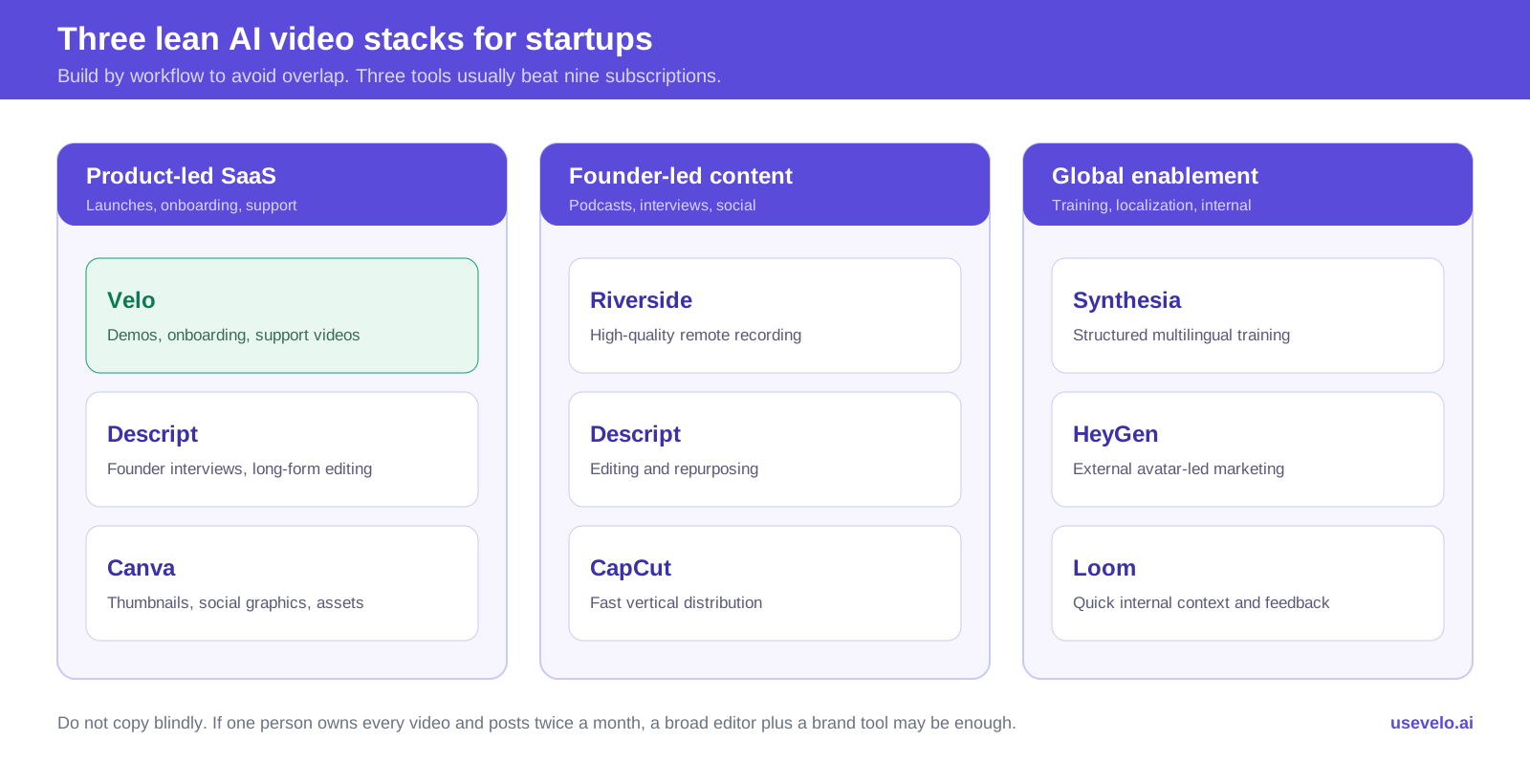
Three lean starter stacks by team type.
Product-led SaaS stack
- Velo for demos, onboarding, and support
- Descript for founder interviews and long-form editing
- Canva for thumbnails, social graphics, and lightweight campaign assets
Founder-led content stack
- Riverside for high-quality remote recording
- Descript for editing and repurposing
- CapCut for fast vertical distribution
Global enablement stack
- Synthesia for structured training
- HeyGen for external avatar-led marketing
- Loom for quick internal context and feedback
Do not copy these stacks blindly. If one person owns every video and publishes twice a month, a broad editor plus a brand tool may be enough. Add a specialist only when a repeated job justifies the workflow and subscription.
How to choose without wasting a month on trials
Run a small production test with real work.
- Pick one video your team must publish in the next 30 days.
- Define the approved source material and one intended viewer action.
- Create a 60 to 90-second version in two shortlisted tools.
- Measure time to draft, review, correct, brand, caption, and publish.
- Make one realistic update after the first export.
- Estimate the monthly cost using actual seats, credits, minutes, storage, and exports.
The update test is especially important. Startup products and messages change quickly, so a video tool that produces an impressive first draft but makes revisions painful creates hidden work every month.
Build the workflow, not the tool collection
The strongest startup video stack is small and intentional. Choose one tool for the video job closest to revenue or customer success, then add recording, editing, design, or generative tools only where they remove recurring work. A focused three-tool workflow will usually produce more useful video than nine disconnected subscriptions.
Turn your next product explanation into a clear video. Try Velo for free or book a demo.