The 8 Best Vidyard Alternatives in 2026
Vidyard combines recording, video messaging, AI avatars, hosting, analytics, and revenue-team workflows. That breadth is useful, but it also means the best Vidyard alternative depends on which part of Vidyard you actually use. Velo is best for teams replacing Vidyard’s demo and onboarding videos, where the real product has to stay on screen and stay current as it changes. For other jobs, use Loom for quick async recording, Wistia for marketing hosting and analytics, or Sendspark for personalized sales outreach at scale.
This guide compares eight Vidyard alternatives by use case, creation workflow, hosting, personalization, integrations, analytics, team fit, and current pricing.
Quick takeaways
- Closest swap for async recording: Loom, for fast screen and webcam messages.
- Best for product demos and reusable work videos: Velo, which keeps the real product on screen and updateable.
- Best for marketing hosting, lead capture, and analytics: Wistia.
- Best for personalized outbound at scale: Sendspark; for sales pages and campaigns: Dubb.
- Best for relationship-led video email: BombBomb; for interactive sales video: Hippo Video.
- Best for branded hosting and live events: Vimeo.
- There is no single Vidyard replacement. Pick by the one job that consumes the most time or budget.
Vidyard alternatives at a glance
| Alternative | Best for | Starting price or pricing model | Main tradeoff |
|---|---|---|---|
| Loom | Fast async screen and webcam messages | Starter $0; Business $18/user/month | Lighter marketing and revenue analytics |
| Velo | Product demos, onboarding, support, and updateable work videos | Free; Pro $49/month | Not a dedicated sales engagement platform |
| Wistia | Marketing video hosting, lead capture, and analytics | Free; Business $79/month | Less focused on one-to-one prospecting |
| Sendspark | AI-personalized B2B outreach at scale | Solo $49/month | Not designed as a broad video CMS |
| Dubb | Sales pages, campaigns, and follow-up workflows | Starter $0; Pro from $42/month billed annually | Broad feature set can take longer to configure |
| BombBomb | Relationship-led video email | Core $36/user/month billed annually | Higher cost for simple recording needs |
| Hippo Video | Sales personalization and interactive video | Pro $20/user/month billed annually | Separate product lines complicate plan comparison |
| Vimeo | Hosting, branded players, galleries, and live events | Starter $12/seat/month | Less specialized for sales outreach |
Pricing reflects each vendor’s published plans at the time of writing. Confirm the current checkout total before you budget, since these tools change tiers, seats, and storage limits often.
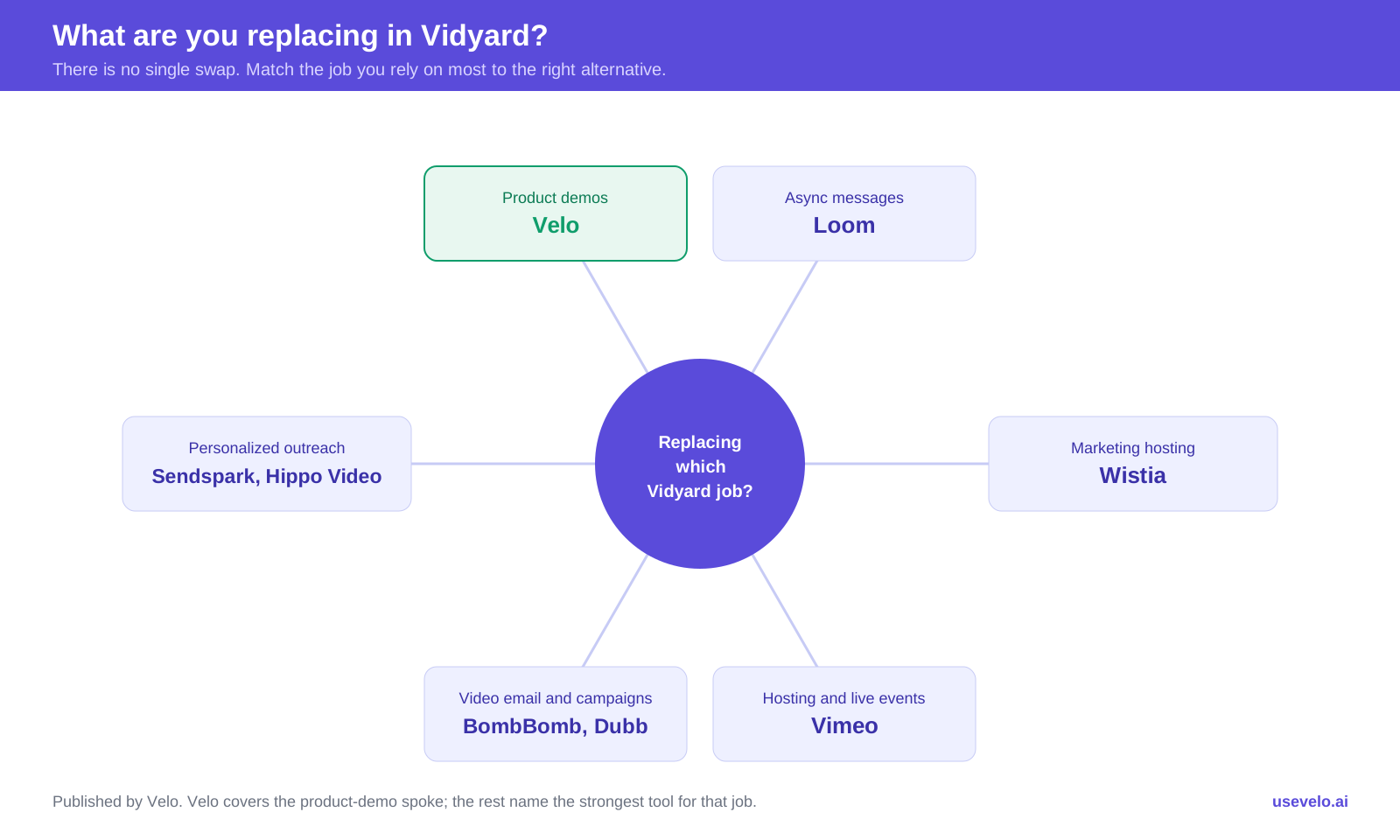
Decision wheel: match the Vidyard job you are replacing to the right alternative.
What is a Vidyard alternative?
A Vidyard alternative is any video tool that replaces one or more of the jobs Vidyard bundles together: recording screen and webcam video, messaging and personalizing it for sales, hosting and analyzing marketing video, and running that video inside revenue workflows. Because Vidyard spans all of those, no single tool is a like-for-like swap. The right alternative is the one built around the job you rely on most, whether that is product demos, async messages, marketing hosting, personalized outbound, video email, or live events.
Why teams look for a Vidyard alternative
Vidyard is primarily positioned around revenue-team video. Its plans include screen and webcam recording, AI-generated video, stock and custom avatars, video sharing, editing, branded pages, calls to action, analytics, and integrations that expand at higher tiers. Starter is currently listed at $59 per seat per month billed annually (about $89 month to month), while Teams and Enterprise move to custom pricing and add broader CRM, marketing automation, governance, and security.
That combination remains a good fit for sales organizations that want video creation, delivery, engagement data, and revenue workflows in one system. An alternative becomes more attractive when the team’s dominant job is narrower or different:
- The team needs polished product demonstrations, not personal prospecting videos.
- Most recordings are internal and do not need revenue analytics.
- Marketing needs a configurable player, lead forms, SEO, and a video library.
- Sales wants to personalize one approved video across a large list.
- The company needs live events or enterprise hosting.
- Per-seat pricing becomes hard to justify across a broad team.
- Important CRM, security, or customization features sit above the entry paid plan.
Do not ask which competitor has the longest feature table. Ask which Vidyard job must be preserved, which jobs can be dropped, and what workflow the replacement should improve.
1. Loom: best for quick async communication
Loom is the simplest Vidyard alternative for teams that mainly record screens and webcams, share links, and discuss the result asynchronously. It fits engineering walkthroughs, bug reports, design reviews, team updates, customer replies, and informal handoffs.
Why choose it over Vidyard
- The recorder and share workflow require little setup.
- Comments, reactions, transcripts, libraries, and common workplace integrations support internal collaboration.
- Business offers unlimited videos and recording time, along with basic editing, branding, and viewer insights.
- Business + AI adds summaries, chapters, tasks, silence removal, filler-word removal, and video-to-text workflows.
- At $18 or $24 per user per month, the paid tiers are easier to justify for broad internal use than Vidyard Starter at $59 per seat.
Where Vidyard is stronger
Vidyard offers a more sales-specific system with richer branded pages, calls to action, revenue analytics, AI avatars, and higher-tier CRM workflows. Loom is excellent for fast communication, but a raw Loom link is not automatically a polished campaign asset. If Loom itself is the thing you are weighing, see our best Loom alternative breakdown.
- Best for: internal async work, customer support replies, feedback, and quick one-to-one explanations.
- Pricing: Starter $0; Business $18/user/month; Business + AI $24/user/month; Enterprise is custom. Our Loom pricing guide covers per-seat costs and Atlassian billing details.
2. Velo: best for product demos and reusable work videos
Velo is the Vidyard alternative to pick when the goal is to explain the product itself, not send a personal webcam message. It turns a rough screen recording, product workflow, document, deck, URL, or prompt into a narrated video for demos, releases, onboarding, training, sales follow-ups, and support.
Why choose it over Vidyard
- The workflow is centered on accurate product screens and company source material.
- Automated screen polish can tighten pauses, steady cursor motion, and zoom into important interface actions.
- Teams can revise scripts and affected scenes when the product changes, so demos do not go stale after each release.
- Voice cloning, an avatar that moves like you, multilingual output, branded hosting, and analytics sit in the same work-video flow.
- A browser agent can record a live workflow for you and decide how to frame and pace it, so a structured asset comes from rough source material instead of one improvised take, and it can refresh itself automatically when the product changes.
- Or skip the source material and read a script off Velo’s teleprompter while you record yourself, and Velo builds the produced demo around it.
Where Vidyard is stronger
Vidyard is the better fit when sales reps need personal webcam outreach, revenue-team performance reporting, deep CRM and marketing automation integrations, and automated prospecting workflows. Velo is not a replacement for a full sales engagement system or a marketing video CMS. Where it wins is production time: LTI Mindtree cut software-demo creation time by about 90%.
- Best for: SaaS product marketing, sales engineering, customer success, support, onboarding, and product education.
- Pricing: Free; Pro $49/month; Ultra $200/month; Enterprise is custom. Output depends on credit usage and video complexity.
3. Wistia: best for marketing video hosting and lead capture
Wistia is a stronger Vidyard competitor when marketing owns the video program. Its configurable player, no-code video replacement, heatmaps, engagement graphs, calls to action, forms, playlists, SEO capabilities, and marketing automation options support website video and lead generation.
Why choose it over Vidyard
- The platform is organized around owned marketing video rather than personal sales messages.
- Business includes player branding, 250 GB of storage, three users, advanced analytics, forms, and CTAs.
- No-code replacement helps teams update an embedded video without changing every page.
- Business + Lead Gen connects viewer engagement to marketing systems and pipeline measurement.
- Wistia also offers recording, editing, AI enhancements, accessibility, and webinar products.
Where Vidyard is stronger
Vidyard has a clearer sales-prospecting experience, including rep-level video messaging, AI avatars, team performance analytics, and CRM-centric delivery. Wistia can support sales content, but its center of gravity is the website and marketing library.
- Best for: demand generation, website video, gated content, video SEO, brand-controlled players, and performance analysis.
- Pricing: Free; Business $79/month with three users and additional users at $25; Business + Lead Gen $329/month; Enterprise is custom. (Wistia moved to storage-based billing in 2026, so confirm your storage tier.)
4. Sendspark: best for AI-personalized sales outreach at scale
Sendspark is built around a focused promise: record one base video and use AI voice cloning, dynamic backgrounds, and variables to create many personalized versions. That makes it more specialized than Vidyard for high-volume B2B prospecting.
Why choose it over Vidyard
- Dynamic backgrounds can show the prospect’s site or another relevant page.
- Voice cloning can speak names and variables without recording every version.
- Personalized thumbnails help each message look specific in an email sequence.
- Growth adds agentic workflows, multiple variables, advanced integrations, API access, and custom domains.
- Plan allowances are expressed in dynamic video minutes, which makes scaled personalization easier to model.
Where Vidyard is stronger
Vidyard provides a broader system for recording, hosting, analytics, team management, and video use across the revenue funnel. Sendspark is not intended to replace a full marketing library or enterprise video platform.
- Best for: SDR and outbound teams sending personalized sales video at meaningful volume.
- Pricing: Solo $49/month, Growth $99/month, Team $299/month, and Business $699/month. Plans include different seats, storage, dynamic video minutes, and workflow-task allowances.
5. Dubb: best for sales pages, campaigns, and conversion workflows
Dubb combines screen, webcam, mobile, and desktop recording with video email, SMS, landing pages, calls to action, campaigns, contact management, and a large integration ecosystem. It is a practical Vidyard alternative for teams that want many sales activities in one platform.
Why choose it over Vidyard
- Conversion-focused landing pages can bring video, CTAs, calendar actions, and related assets together.
- Email and SMS campaigns support multi-channel follow-up.
- Desktop, mobile, and browser recording cover different seller workflows.
- Pro Plus adds automation, custom domains, deeper branding, 4K output, and retargeting.
- The free tier lets a team evaluate the core creation and delivery experience.
Where Vidyard is stronger
Vidyard’s positioning and interface may feel more focused for organizations already standardized on its CRM and marketing ecosystem. Dubb’s breadth can require more initial setup, and buyers should decide whether they need its campaign and contact-management features or already own those functions elsewhere.
- Best for: small sales teams, agencies, and owner-led businesses that want video, landing pages, campaigns, and follow-up in one place.
- Pricing: Starter $0; Pro from $42/month billed annually; Pro Plus from $90/month billed annually; Enterprise is custom.
6. BombBomb: best for relationship-led video email
BombBomb focuses on personal video messaging through email, browser extensions, mobile apps, and sales workflows. It is especially relevant to relationship-driven industries where the sender’s face and familiarity matter more than a sophisticated video library.
Why choose it over Vidyard
- Gmail and Outlook integrations keep recording and sending close to email.
- Core includes unlimited video messages, custom branding, privacy controls, secure hosting, and engagement analytics.
- Copilot adds scripts, notes, summaries, audio enhancement, team assignments, automated workflows, CRM sending, and adoption reporting.
- Mobile apps support sellers and advisors who communicate away from a desk.
Where Vidyard is stronger
Vidyard covers more formats, including AI avatars, automated delivery, broader video hosting, and an expanding set of revenue integrations. BombBomb can be expensive if the only requirement is simple screen recording, and some of its strongest workflow features sit on Copilot or Enterprise.
- Best for: real estate, financial services, account management, and sales teams where personal trust drives response.
- Pricing: Core $36/user/month billed annually or $42 monthly; Core + Copilot $56 annually or $70 monthly; Enterprise is custom.
7. Hippo Video: best for interactive and personalized sales video
Hippo Video provides video messaging, screen and webcam recording, sales pages, interactive calls to action, AI-assisted editing, personalization, and sales-platform integrations. It is a strong middle ground for teams that want more sales functionality than Loom without committing to Vidyard.
Why choose it over Vidyard
- Pro includes advanced editing, analytics, custom branding, interactive CTAs, and virtual backgrounds.
- Teams adds sales-platform integrations, advanced sales pages, team reporting, document-to-video, and larger personalization allowances.
- Automated personalized videos can vary names, images, and text.
- Enterprise adds role controls, SSO, Salesforce integration, and dedicated support.
Where Vidyard is stronger
Hippo Video presents separate sales-video and broader AI video creation offers on the same pricing page, which makes plan comparison less intuitive when a team needs both. Vidyard has a more coherent enterprise revenue-video story and clearer differentiation between core tiers.
- Best for: growing sales teams that want interactive video pages, AI editing, and integrations at a lower listed entry price.
- Pricing: Sales Pro $20/user/month billed annually or $30 monthly; Teams $60 annually or $75 monthly; Enterprise from $80/user/month annually with a 10-seat minimum. Verify the correct product line before buying.
8. Vimeo: best for branded hosting and live events
Vimeo is the most relevant alternative when Vidyard is being used primarily as a hosting platform. It offers an ad-free customizable player, privacy, review tools, analytics, branded galleries, lead capture, CTAs, live streaming, webinars, and enterprise controls.
Why choose it over Vidyard
- Starter includes 2 TB of storage, 2 TB of monthly bandwidth, unlimited screen recording, and player customization.
- Standard adds branding, galleries, lead capture, calls to action, custom cards, and stock media.
- Advanced includes hosted live events, Q&A, polls, chat, multistreaming, and event analytics.
- Enterprise adds custom permissions, SSO, SCIM, security, advanced integrations, and support.
Where Vidyard is stronger
Vimeo is less specialized for personal prospecting, sales-team adoption, rep performance, and CRM-triggered video workflows. Its strengths are hosting, brand presentation, distribution, and events. Choose it when those are the real requirements.
- Best for: marketing libraries, embedded website video, brand channels, webinars, live events, and large media archives.
- Pricing: Starter $12/seat/month; Standard $25/seat/month; Advanced $75/seat/month; Enterprise is custom (ignore any $0 placeholder that appears in the public plan markup).
Head-to-head: quick answers
Short answers to the comparisons buyers ask most.
Loom vs Vidyard: Loom is better for fast internal screen recordings and async collaboration at a lower per-seat price. Vidyard is better for sales video, branded sharing, revenue analytics, AI avatars, and CRM-driven workflows. Choose Loom to communicate, Vidyard to sell with engagement data.
Wistia vs Vimeo for hosting: Wistia is the stronger marketing-hosting choice, with player customization, lead capture, heatmaps, and video SEO. Vimeo wins on large storage allowances, branded galleries, review workflows, and live events. Pick Wistia for demand gen, Vimeo for a media library and events.
Sendspark vs Dubb vs BombBomb for sales: Sendspark is for scaling one personalized video across a large list. Dubb is for sales pages and multi-channel campaigns. BombBomb is for relationship-led personal video email. Choose by whether you value volume, campaign orchestration, or personal trust most.
Velo vs Vidyard for demos: Vidyard records a rep talking about the product; Velo turns the product itself into a narrated, on-brand demo you can update as the interface changes. For a demo where the buyer must see the software work, the product-first approach is usually clearer than a webcam message.
Which Vidyard alternative should you choose?
Start from the job that consumes the most time or budget.
| Your main requirement | Best shortlist |
|---|---|
| Accurate, polished product demos | Velo |
| Internal screen and webcam messages | Loom |
| Website hosting, video SEO, forms, and analytics | Wistia |
| Personalized outbound at scale | Sendspark |
| Sales pages, campaigns, SMS, and follow-up | Dubb |
| Personal video email and team adoption | BombBomb |
| Interactive sales video at a lower entry price | Hippo Video |
| Branded hosting, galleries, and live events | Vimeo |
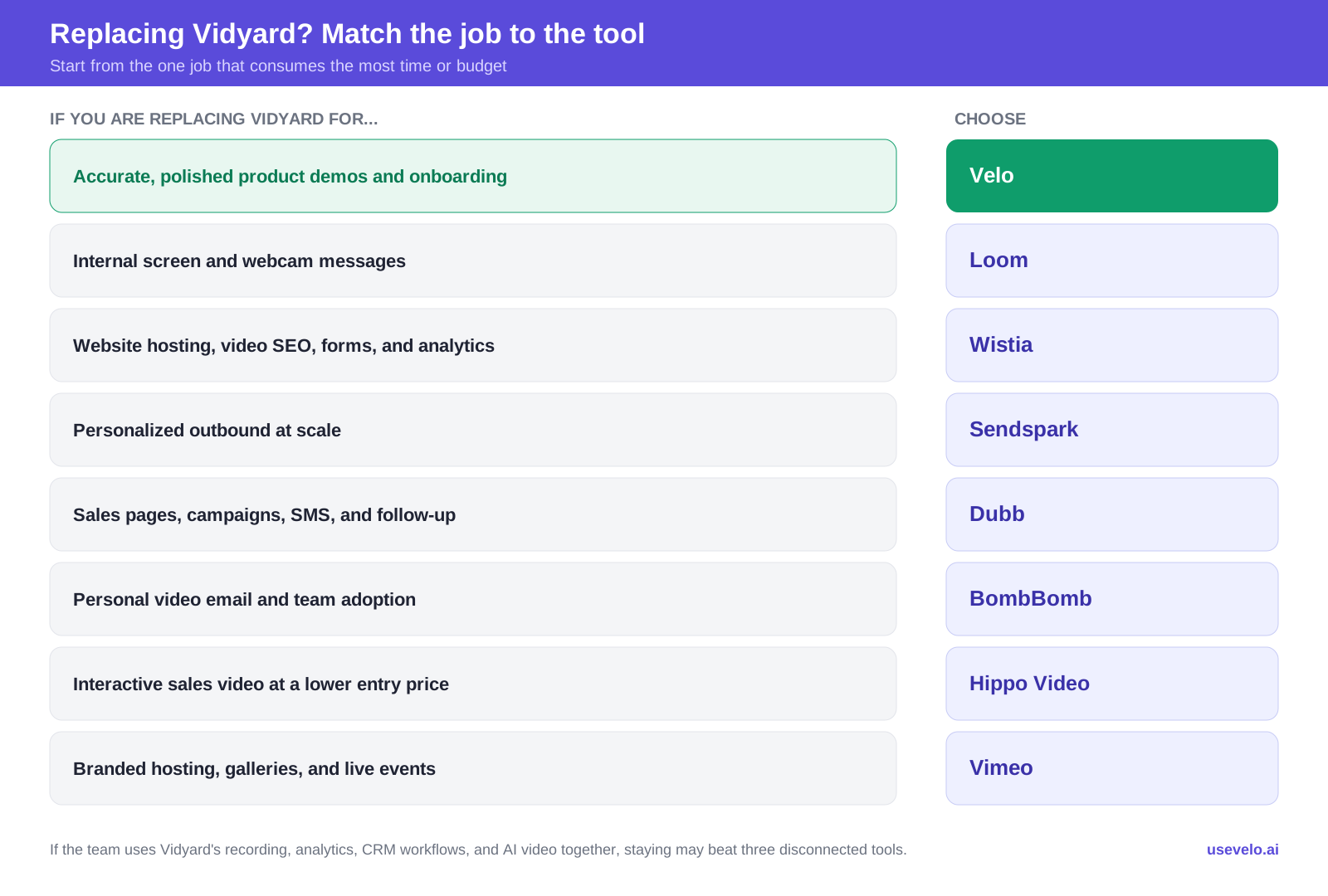
Job-to-tool map: the Vidyard job you are replacing points to the best-fit alternative.
Vidyard may still be the right choice if the team actively uses its recording, revenue analytics, branded sharing, CRM workflows, and AI video capabilities together. Replacing it with three disconnected subscriptions can save nothing and create more operational work.
Before switching, reproduce one real workflow from beginning to end. Record or generate the video, add branding, send it through the normal channel, capture a CTA, sync the engagement, review analytics, and make an update. Compare the entire path, not just the editor.
What to compare beyond the monthly price
The listed subscription is only one part of total cost. Review:
- Creator, admin, and viewer seat rules.
- Annual commitments and minimum seat counts.
- AI video, avatar, personalization, or generation allowances.
- Storage, bandwidth, recording length, and export resolution.
- Branding removal, custom domains, forms, and CTAs.
- CRM, marketing automation, email, and sales engagement integrations.
- Captions, translation, accessibility, and transcription limits.
- SSO, SCIM, permissions, data retention, and domain restrictions.
- Onboarding, support, implementation, and migration work.
Also decide what happens to existing links, embeds, analytics, folders, captions, and CRM activity when you leave Vidyard. A technically better tool can still be the wrong migration if important historical assets or workflows cannot move cleanly.
Choose the workflow you want to improve
The best Vidyard alternative is not the product that imitates every Vidyard feature. It is the one built around your dominant video job. Separate product demos, async communication, website hosting, personalized outreach, video email, and live events before comparing prices. That decision usually reduces both tool overlap and implementation risk.
Create a clearer video from your product or existing material. Try Velo for free or book a demo.